Shopify SEO Keywords: How to Find and Use Them (2026)
Shopify SEO keywords are the words and phrases your customers type into Google when they are looking for what you sell. Getting them right is the first move in SEO, because a page can only rank for a search if it is clearly about that search. This guide shows how to find the keywords worth targeting for a Shopify store, and exactly where to place them so Google understands each page. For the full ranking process around keywords, see our guide to how to rank your Shopify store on Google.
Key takeaways
- A keyword is a search you want to rank for. Pick ones with real buyer intent, not just high volume.
- Find them from Google autocomplete and related searches, your competitors' titles, and your own Search Console and Shopify search data.
- Place the keyword in the page title, URL handle, meta description, an H1 or H2, and image alt text. Product-title SEO matters most, because the title is the strongest on-page signal.
- One primary keyword per page. Two pages chasing the same keyword compete with each other instead of ranking.
On this page
What Shopify SEO keywords are
A keyword is simply a search query you want a page to rank for. It does not have to be a single word: "leather laptop bag" and "best running shoes for flat feet" are keywords too, and the longer ones often convert better because the intent is clearer.
Keywords split by intent, and intent is what decides where a keyword belongs on your store:
- Commercial or buyer-intent keywords ("leather laptop bag", "wireless charger for iPhone") signal someone ready to buy. These belong on product and collection pages.
- Informational keywords ("how to clean a leather bag", "do wireless chargers work with cases") signal research. These belong on blog posts, which then link to the relevant products.
You also weigh two things for every keyword: search volume, or how many people search it, and difficulty, or how hard the current top results are to beat. A newer store wins faster by targeting specific, lower-difficulty long-tail keywords first, then moving up to broader terms as the store gains authority.
How to find keywords for your Shopify store
You do not need paid tools to start. Work through these sources in order.
Google autocomplete and related searches. Type a product term into Google and read the suggestions, then scroll to the "People also search for" and "Related searches" at the bottom. These are real queries, straight from Google.
Your competitors' titles. Search your main product term, open the stores that rank on page one, and look at how they word their product and collection titles. Those wordings are ranking for a reason.
Google Search Console. If your store is already live, the Performance report lists the exact queries you appear for. Queries where you show up on page two or three, but do not yet have a page built around them, are your fastest wins: the demand is proven and you are close.
Your Shopify search bar. In Shopify admin under Analytics, the top online store searches show what visitors type into your own search box. That is unfiltered buyer language for your exact catalog.
Keyword tools. Free options like Google Keyword Planner or the keyword features in an SEO app give you volume and difficulty estimates so you can prioritize. More on tools below.
Where to put keywords on Shopify
Once you have a primary keyword for a page, place it in the spots Google weighs most. Use the keyword naturally, in language a person would read, not stuffed.
| Where | Why it matters |
|---|---|
| Page title (title tag) | The single strongest on-page signal. Lead with the keyword. |
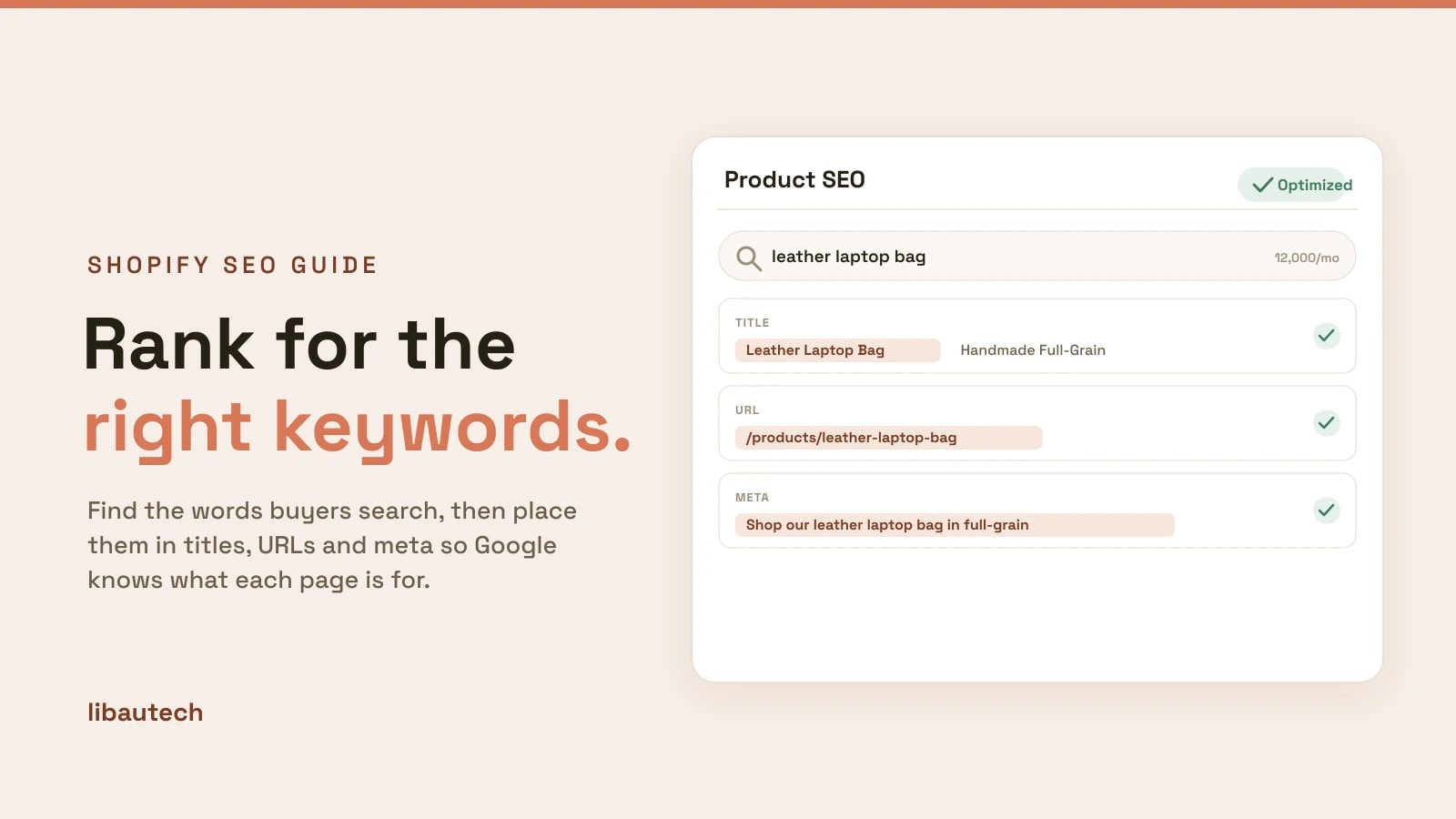
| URL handle | Keep it short and keyword-led, such as /products/leather-laptop-bag. |
| Meta description | Does not rank you directly, but a keyword-matched description lifts click-through. |
| Headings (H1, H2) | Confirms the page topic. The product name is usually the H1. |
| Body and description | Use the keyword and its variants once or twice in unique, useful copy. |
| Image alt text | Describes the image to Google and helps you rank in image search. |
In Shopify, the title tag and meta description are set per page under the "Search engine listing" section (click Edit website SEO on any product, collection, page or blog post). The URL handle is edited in that same section.
Product-title SEO, the highest-value spot
If you change one thing, change your product titles. Product-title SEO carries more weight than any other single field, and most stores waste it on bare brand names or internal SKUs.
The pattern that works is primary keyword first, then the detail. "Leather Laptop Bag, Handmade Full-Grain" beats "The Ashworth" because it leads with what people actually search. Keep the storefront name readable for shoppers, and if you want a different wording for Google, set the SEO title in the search engine listing separately from the product's display name.
Do the same for collection titles, which target broader keywords ("Leather Bags") and often rank for the head terms individual products cannot.
SEO plugins and keyword tools for Shopify
Shopify covers the basics natively: it generates a sitemap, lets you edit every title tag and meta description, and adds some structured data. For keyword research and bulk optimization, an SEO app or plugin speeds things up. The common jobs a Shopify SEO plugin or SEO manager app handles are keyword suggestions and difficulty, bulk editing of titles and meta across your whole catalog, broken-link and redirect management, and structured-data or image-optimization checks.
You do not need all of that on day one. Start with free keyword research and manual on-page edits, then add a tool once you have more products than you can optimize by hand. For a shortlist of the options, see our roundup of the best Shopify SEO apps.
Common keyword mistakes
Chasing volume over intent. A broad head term with huge volume is hard to rank and often full of browsers, not buyers. A specific long-tail keyword converts better and ranks sooner.
Keyword stuffing. Repeating the keyword unnaturally reads badly and does not help rankings. Write for the shopper first and place the keyword where it fits.
Targeting the same keyword on two pages. This is keyword cannibalization: the pages split their signals and neither ranks well. Give each page one primary keyword.
Ignoring the data you already have. Search Console and your Shopify search bar show real queries you can win right now. Optimize for those before guessing at new ones.
Keywords are step one. Once your pages target the right terms, the rest of ranking, technical SEO, content and backlinks, is covered in the Shopify SEO guide, or work straight through the Shopify SEO checklist.