How to Write Shopify Blog Posts With AI That ChatGPT Cites
How to write Shopify blog posts with AI is the wrong question if you think the goal is traffic. I have run Shopify apps for five years and tested nearly every acquisition channel a store can buy. Blog posts written with Claude and published straight into Shopify are the cheapest, highest-quality traffic I have found. Not because the writing wins awards. Because of what the post does after Google indexes it.
Everyone tells me the Shopify blog is dead. Nobody reads brand blogs. AI Overviews took the clicks. Just run ads. I hear a version of that every week from store owners.
They are wrong, and the reason they are wrong is the reason the window is open right now. Almost nobody in your category is publishing. So when ChatGPT goes looking for a page to cite about your product, there is close to nothing there. Someone fills that gap in the next 90 days. It should be you.
The short version
- Traffic is no longer the point of a Shopify blog. Being the page ChatGPT, Gemini and Perplexity cite for a buying question is the point.
- A post written with AI and published to Shopify costs nothing in media and keeps compounding after it indexes.
- Every reader of a category post is an intent-qualified pixel you can retarget on Meta in Q4 for a fraction of cold acquisition cost.
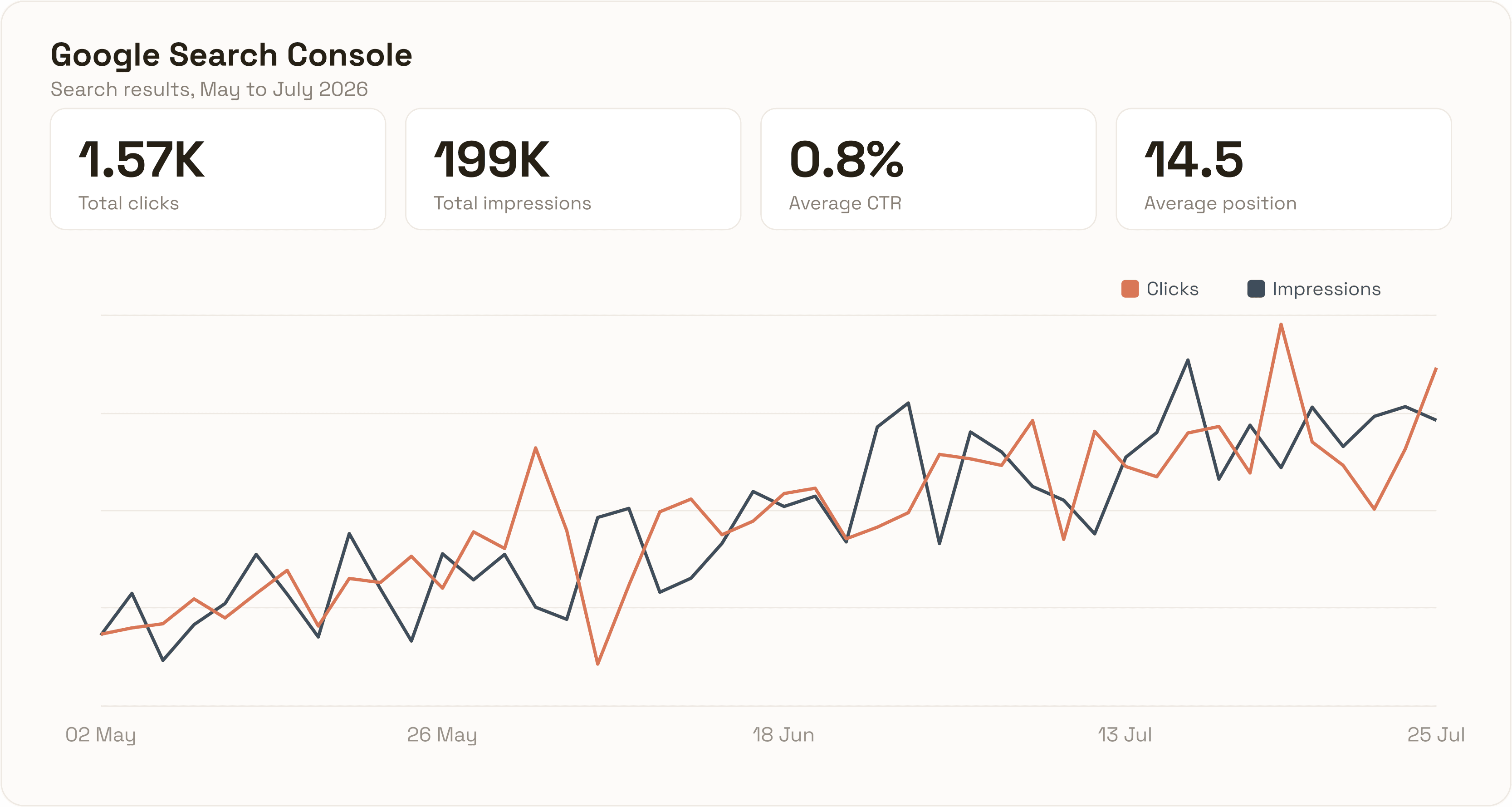
- One store I ran this on reached 199,000 impressions and 1,570 clicks in three months, from May to July 2026, on zero ad spend.
- An average position of 14.5 and a 0.8% click-through rate are not failure. They are 199,000 proofs of relevance sitting one title rewrite away from a cheap click.
The citation is the asset, not the traffic
Blog traffic is no longer the point of blogging. The point is being the page that ChatGPT, Gemini and Google's AI layer pull from when someone asks a buying question. The traffic is a side effect. The citation is the asset.
There is a second-order effect nobody talks about. Everyone who lands on that post is a warm, intent-qualified pixel. You retarget them on Meta in November with a Black Friday offer, and your cost per acquisition collapses, because you are not paying to find these people cold. They already read 900 words about the exact problem your product solves.
Cold Meta traffic in Q4 is the most expensive it will ever be. Retargeting a blog audience you built in August is not.
The exact process, in eight steps
Step 1. Export the demand you already have
Do not start from a keyword tool. Start from demand you can already see. Pull three exports.
In Google Search Console, open Performance, then Search results. Set the date range to the last 12 months. Open the Queries tab and export the full table, not the 1,000 rows the screen shows by default, using the export button at the top. Then apply one filter: exclude your brand name, so you are left with category demand rather than people already looking for you.
Next, the Google Ads search terms report. Not the keywords you bid on, the actual search terms that triggered your ads. That report is the underrated one. It is people typing real sentences with real money attached. Keyword tools hand you cleaned-up head terms. Search terms reports show you how buyers actually talk.
Last, category search data from a source like vidIQ for YouTube, which tells you the questions people are asking in video, where a lot of pre-purchase research now happens.
Step 2. Turn the data into 100 buyer queries
Upload all three exports to Claude. Ask for 100 queries written the way your customer would actually type them into Google, ChatGPT or Claude when they are trying to buy, not research.
The distinction decides everything. "What is a merino base layer" is a research query. "Best merino base layer for skiing under 100 euros" is a buying query. You want the second kind. Purchase intent, comparison intent, alternative intent.
One hundred is the right number. Below 50 you do not have enough surface area to own a category. Above 150 you are padding the list with variations that resolve to the same answer.
Step 3. Run the queries through the AI engines
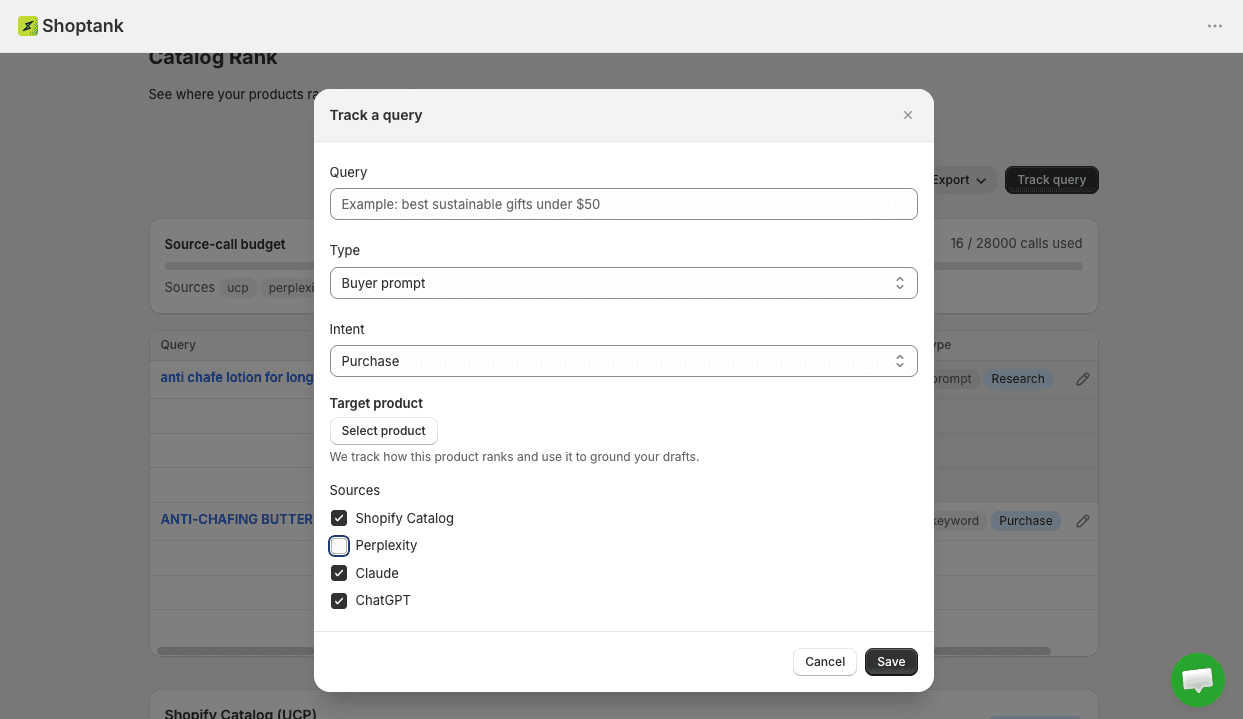
I load the 100 queries into Shoptank. It runs each one through ChatGPT and Gemini and collects what comes back: which pages got cited, which source domains the models pulled from, and what those pages were actually about.
This is the step that turns guessing into reading. You are looking at the answer key. For every buying query in your category, you can see which pages the model already trusts, and you can see the shape of the content that earned the citation. You do not have to guess what to write. You can read it. Shoptank also runs as a Shopify app so the tracking sits next to your catalog.
Step 4. Export the answer key as a CSV
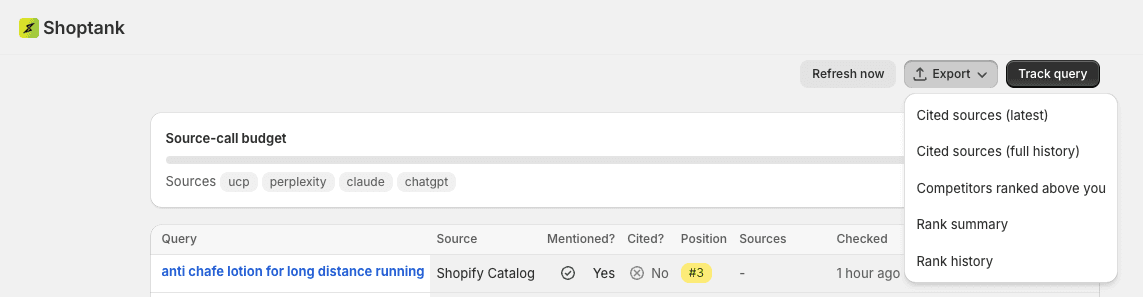
Export the whole run as a CSV. Keep it simple: one row per query, with columns for the engine, whether you were mentioned, whether you were cited, your position, the pages that were cited above you, and the domains those pages live on. That CSV is the brief for every post you are about to write. It is also the file you hand to the model in the next step, so keep the column names plain.
Step 5. Publish against the answer key
I connect Shopify to Claude over MCP and hand it the CSV. The instruction is specific: create posts on the same topics the answer key surfaced, dated for the current year, with an FAQ block at the end, using real product images pulled from my Shopify catalog. Claude writes them and publishes them straight into Shopify. No copy paste. No CMS busywork. No waiting on a writer.
You are not hoping a topic ranks. You have already watched the model cite a thin page for it, and you are publishing the better one.
Step 6. Make the FAQ block and the images do the work
Two details separate this from slop.
The FAQ block is not decoration. It is the part models lift word for word. Put the question in a header and the answer in two to three sentences directly underneath. That structure is what gets extracted into an AI answer. A wall of prose does not.
The images are real product photos from your own catalog, not stock. Your product, your photography, your alt text. Stock images signal a content farm to Google and to a human deciding in half a second whether to trust the page. Your own product shots signal the opposite.
Step 7. Index in Google and Bing by hand
Submit each new post to Google Search Console and to Bing Webmaster Tools manually. Do not wait for a crawl to find them. Bing matters more than people expect here, because a large share of ChatGPT's retrieval index comes from Bing. If you skip Bing, you are optimising for citations while leaving out the index half the citations are drawn from.
Step 8. Optimise on the impression data
Then wait for impressions. Once a post has impression data but a weak click-through rate, that is not a failed post. That is a post ranking under the wrong title. Feed the query data back to Claude and rewrite the title and meta description against the queries the page is actually showing up for.
Impressions without clicks is the easiest fix in SEO, and almost nobody does it, because it means going back to something you already published. This is also where a broader Shopify SEO strategy compounds: the pages are already relevant, so you are tuning titles, not starting projects.
What this looks like on a real store
I ran this for a client starting in May. Here is three months of Search Console data, May to July 2026.
199,000 impressions. 1,570 clicks. Average position 14.5. Click-through rate 0.8%.
Daily clicks went from roughly 10 in early May to between 25 and 40 by late July. Impressions went from around 1,200 a day to over 4,000, on zero media spend.
Now look at the two weak numbers, because they are the interesting part.
Position 14.5 means the average post sits on page two. A 0.8% click-through rate means that of nearly 200,000 people who saw one of these pages in a result, 99.2% did not click.
That is not a failure. That is 199,000 impressions of proof that Google has decided these pages are relevant to these queries, sitting there waiting for a title rewrite. Moving average position from 14.5 to 9 and click-through rate from 0.8% to 2% is not a new content project. It is feeding the query export back to Claude and rewriting headlines against what the pages already rank for.
Most people look at 0.8% and conclude blogging does not work. I look at it and see the cheapest click I will buy this year sitting one optimisation pass away.
The two post types that beat everything else
Do not just write how-to posts. Two formats consistently rank first in the biggest category queries, because almost no one publishes them well.
Best [category] posts
These are the queries with money on them. "Best waterproof dog collar 2026" gets typed with a card already out. Write yours. Include your product honestly. Include competitors honestly. A list of one is not a list, and both the models and the reader can tell. The page that ranks is the one that reads like a real comparison, not a one-item advert.

Competitor alternative posts
"[Competitor] alternatives" is the highest-intent query that exists in any category. Someone typing it has already decided to leave. The only open question is where they go. If you do not own that page, your competitor's other competitor does. I run both formats for my own apps, and the alternative pages out-earn every other post format, in Google and in what the models cite.
How to keep the output from reading like AI
Update your Claude writing skill so the output is not 100% AI-shaped. If every post reads like the same model wrote it, you get pattern-matched into the low-trust bucket.
The tell is not vocabulary. It is structure. Uniform paragraph length. Every section the same size. An intro that restates the title. A conclusion that restates the intro. Break that pattern and you are most of the way there. Load an outside writing style guide once, then apply it to every post after.
Then add what a model cannot: your own opinion, a number nobody else has published, and the thing you got wrong. Models cite pages that contain information found nowhere else. So do humans. If you want a fuller playbook on the citation side, I wrote a separate guide on how to get cited in AI search.
Why the window closes before Q4
Right now the average Shopify store has zero blog posts, or twelve posts from 2021 about how to style a scarf. That means the citation slots in your category are sitting empty. Whoever publishes first gets pulled into the retrieval layer, and once a model trusts a source for a query, dislodging it is hard.
The lag is the whole reason to start in August and not October. Indexing takes weeks. Impressions take weeks after that. Optimisation takes another cycle. A post published in September is retargetable audience in November. A post published in November is a post you paid for and cannot use until Q1.
One hundred queries. One hundred posts. One afternoon of setup, before the Q4 spend starts. Everyone else is going to pour that budget into cold Meta traffic and wonder why their CPMs doubled.