
8 Best Shopify Navigation Apps (2026)
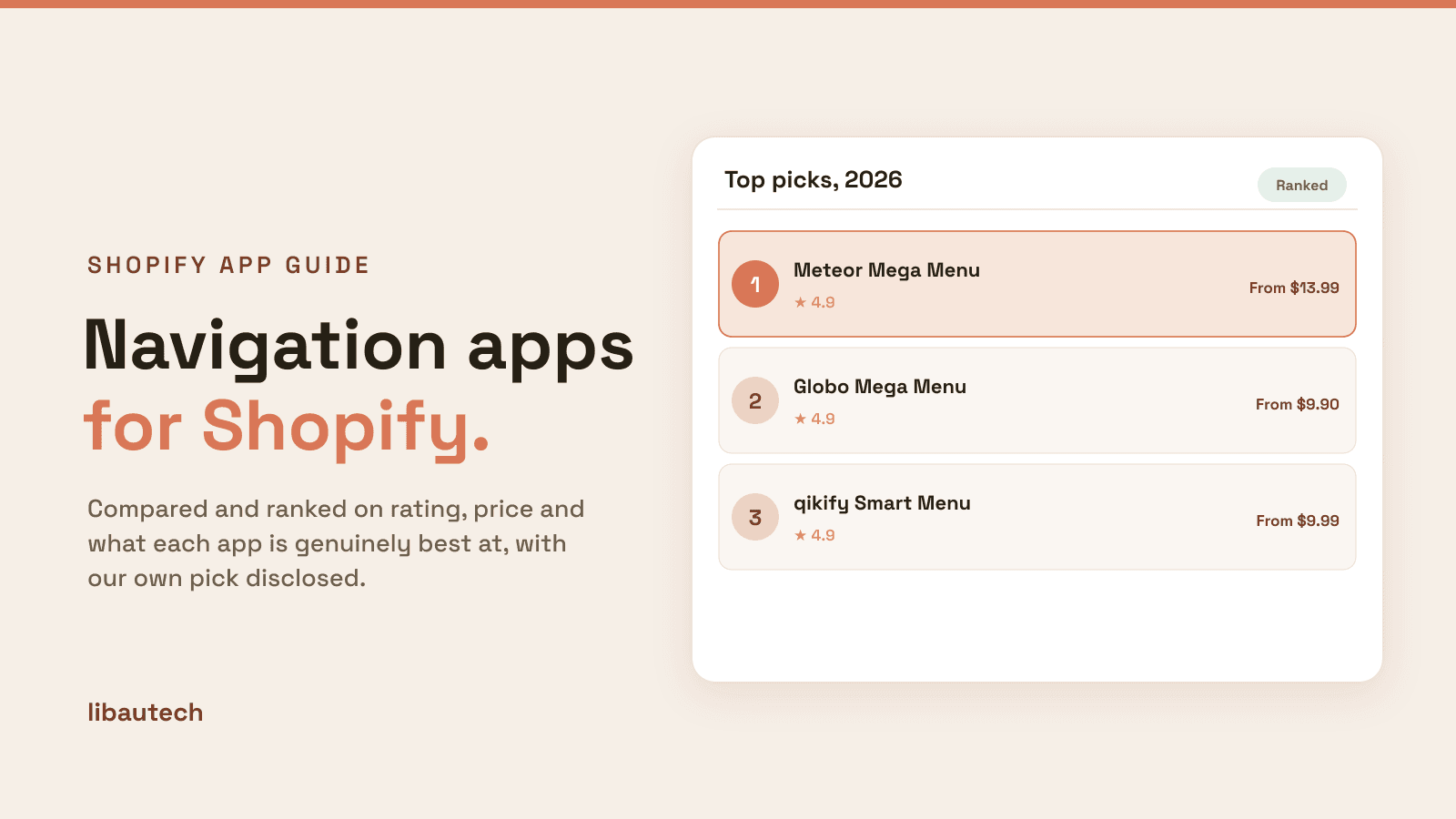
Last updated: April 2026 · Pricing and ratings verified from live Shopify App Store listings on April 30, 2026. Reviewed by the Libautech team — builders of Built for Shopify apps used by 5,000+ merchants across 50+ countries.
Key Takeaways
- Shopify navigation apps split into three distinct jobs that competitor blogs treat as one. Mega menu builders (Meteor, Globo, qikify) handle header navigation with multi-column dropdowns, image promotions, and structured catalog browsing. Mobile-first navigation apps (Buddha, Navi+, AAAeCommerce) build bottom tab bars and mobile-optimized menus that replace standard hamburger navigation. Native enhancement apps (Stilio, EasyNav) extend Shopify's built-in navigation with breadcrumbs, sticky headers, and sidebar nav at lower cost.
- Mobile traffic represents 60-70% of most Shopify stores yet competitor blogs focus almost exclusively on desktop mega menus. The standard Shopify hamburger menu (three lines, click to open) converts at 30-40% lower rates than dedicated mobile navigation patterns (bottom tab bars, persistent navigation, swipe gestures). Stores investing only in mega menus optimize for the smaller traffic segment.
- Mega menus earn their cost when catalog complexity makes simple dropdowns insufficient. Stores with 200+ products organized across 5+ top-level categories benefit from multi-column dropdowns showing collection structure visually. Stores with 50 products and 3 collections don't — the native Shopify dropdown handles that scale just fine, and a mega menu adds visual complexity without conversion benefit.
- Pricing varies dramatically across layers. Mega menu builders run $9.99-29.99/mo with usage-based scaling. Mobile-first navigation apps run $7.95-19.99/mo flat. Native enhancement apps run $4.99-14.99/mo. The right app costs less than $20/mo for most stores once the actual navigation bottleneck is identified.
- Bottom tab bars (Navi+, AAAeCommerce-style) drive 15-25% mobile conversion lift versus standard hamburger menus because navigation stays visible during scroll rather than requiring a tap to access. The pattern matches mobile app conventions customers already know from Instagram, TikTok, Amazon, and other major apps. For mobile-heavy stores, this single change often outperforms desktop mega menu investments.
- The biggest navigation mistake is investing only in desktop mega menus when 60-70% of traffic is mobile. A $29/mo mega menu that improves desktop browsing for 30-40% of traffic delivers less revenue lift than a $9/mo bottom tab bar that improves mobile browsing for 60-70% of traffic. Match the navigation app to where traffic actually comes from.
Who Needs a Navigation App, and Why?
A navigation app matters once your catalog is too big for a simple menu. A mega menu with columns, images and featured products helps shoppers find categories fast, and a sticky or bottom navigation bar keeps key links in reach on mobile, where most people browse. Better navigation means fewer dead ends and more products discovered.
You need one if you have many collections, a deep catalog, or high mobile traffic. A small store with a handful of collections is usually fine on the theme's built-in menu.
The Three Jobs of Shopify Navigation Apps
Most roundups of Shopify navigation apps lump together mega menu builders, mobile navigation tools, and native enhancement apps as if they're solving the same problem. They are not. A mega menu builder handles desktop header navigation with multi-column dropdowns, image promotions, and structured catalog browsing. A mobile-first navigation app builds bottom tab bars, mobile-optimized menus, and gesture-based navigation patterns that replace standard hamburger menus. A native enhancement app extends Shopify's built-in navigation with breadcrumbs, sticky headers, and sidebar nav at lower cost without replacing the underlying menu structure. Different mechanics, different device focus, different cost structures.
The honest framing: Shopify navigation apps break into three distinct jobs. Most stores need exactly one based on the actual navigation bottleneck and traffic composition — picking only desktop mega menus when 70% of traffic is mobile leaves the larger conversion opportunity uncovered.
The first job is mega menu builders — desktop header navigation with multi-column dropdowns, embedded images and promotional content, structured catalog browsing across collections and vendors, and visual emphasis on top-tier merchandise. The mechanics: app extends the theme's header navigation with custom dropdown layouts containing multiple columns, images, custom HTML, and merchandising blocks. Meteor Mega Menu, Globo Mega Menu, and qikify Smart Menu lead this layer. The right pick when desktop catalog complexity (200+ products, 5+ top-level categories) makes simple dropdowns insufficient.
The second job is mobile-first navigation — bottom tab bars, mobile-optimized menus, persistent navigation that stays visible during scroll, and gesture-based patterns matching native app conventions. Different mechanics from desktop mega menus: navigation lives at the bottom of the viewport (matching iOS/Android app patterns) rather than being hidden behind a hamburger menu, with touch-optimized targets and swipe interactions. Buddha Mega Menu Mobile, Navi+ TabBar, and AAAeCommerce Mobile Menu lead this layer. The right pick when mobile traffic exceeds 50% of sessions and standard hamburger conversion is the bottleneck.
The third job is native + lightweight navigation enhancement — extending Shopify's built-in navigation with breadcrumbs, sticky headers that follow scroll, sidebar collection navigation, and basic dropdown styling without replacing the underlying menu structure. The mechanics: app uses theme navigation as the base and adds focused enhancements (breadcrumb trails, sticky behavior, mobile menu polish) at lower cost than full mega menu rebuilds. Stilio Mega Menu and EasyNav lead this layer. The right pick when catalog scale doesn't justify mega menus and mobile traffic isn't dominant.
This post ranks 8 apps across the three jobs based on verified April 2026 Shopify App Store data and what each one actually solves.
Navigation apps stack with broader storefront tools. See our guides on best Shopify search and filter apps for the related discovery layer that complements navigation, best Shopify collection management apps for the related catalog organization layer that intersects with navigation structure, and best Shopify design customization apps for the broader theme customization layer where navigation styling lives.
Quick Comparison: 8 Best Shopify Navigation Apps (2026)
| App | Rating | Free Plan | Paid From | Layer | Best For |
|---|---|---|---|---|---|
| Meteor Mega Menu | ⭐ 4.9 (700+) | Free trial | $13.99/mo | Mega menu | Most-installed mega menu, drag-and-drop builder |
| Globo Mega Menu | ⭐ 4.9 (1,000+) | Yes | $9.90/mo | Mega menu | Largest review base, generous free tier |
| qikify Smart Menu | ⭐ 4.9 (500+) | Yes | $9.99/mo | Mega menu | Performance-focused, conditional display rules |
| Buddha Mega Menu Mobile | ⭐ 4.7 (1,400+) | Yes | $9.99/mo | Mobile-first | Established mobile navigation with mega menu |
| Navi+ TabBar & Bottom Bar | ⭐ 4.9 (300+) | Yes | $7.95/mo | Mobile-first | Bottom tab bar, app-like mobile navigation |
| AAAeCommerce Mobile Menu | ⭐ 4.8 (200+) | Free trial | $9.99/mo | Mobile-first | Native app-style mobile navigation overhaul |
| Stilio Mega Menu | ⭐ 4.9 (300+) | Yes | $4.99/mo | Native enhancement | Lightweight mega menu, lowest entry pricing |
| EasyNav: Sticky Sidebar Nav | ⭐ 4.9 (200+) | Yes | $4.99/mo | Native enhancement | Sticky sidebar nav, breadcrumbs, page anchors |
Layer 1: Mega Menu Builders
This layer is for stores with desktop catalog complexity (200+ products, 5+ top-level categories) where simple Shopify dropdowns can't show structure efficiently. The mechanics: app extends the theme's header navigation with custom dropdown layouts containing multiple columns, images, custom HTML, and merchandising blocks. Three apps lead this layer.
1. Meteor Mega Menu
Best for: Shopify stores wanting the most-installed mega menu builder with drag-and-drop layout, pre-designed templates, and broad theme compatibility — the default mega menu pick.
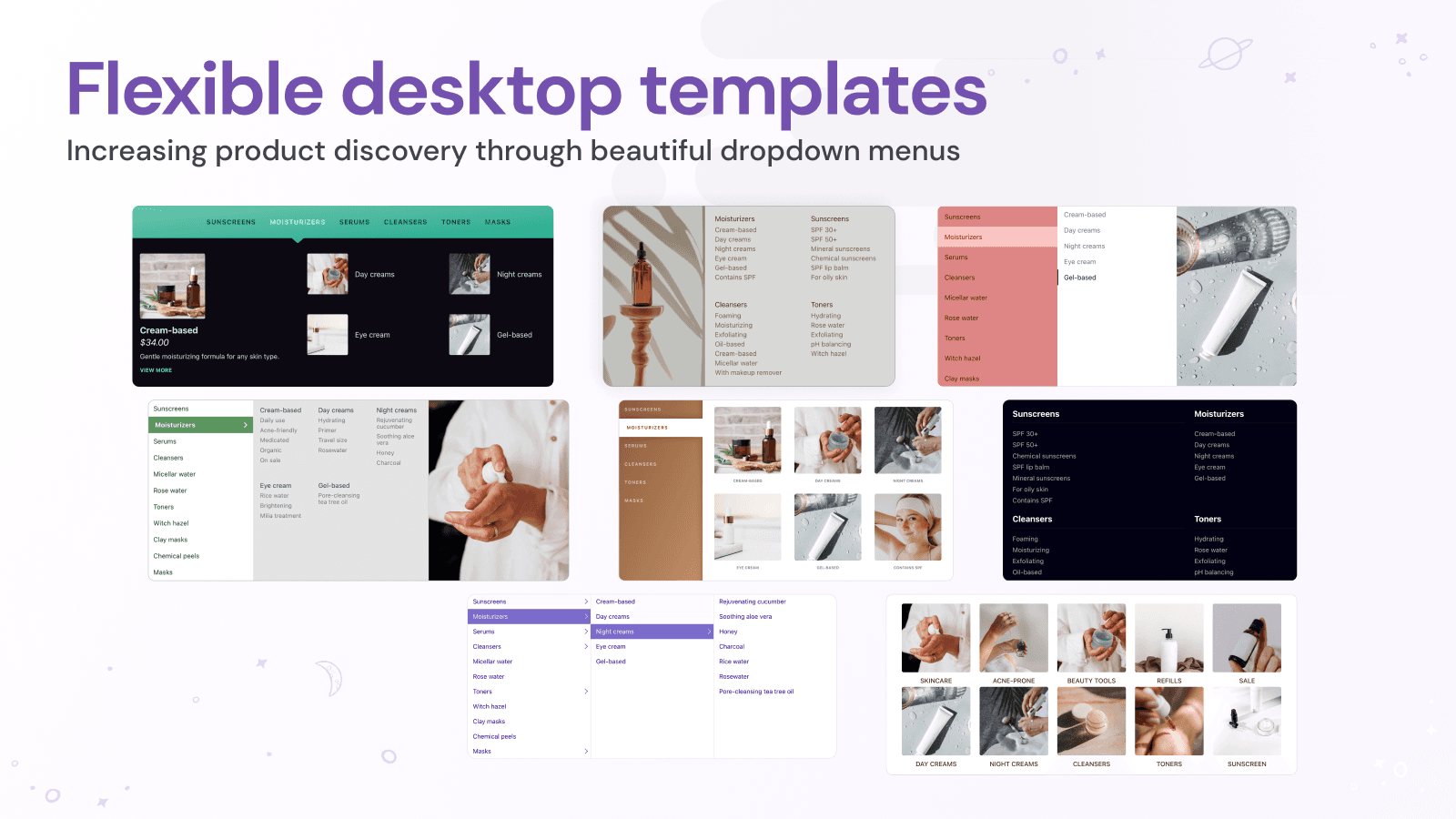
Meteor Mega Menu holds 4.9 stars across 700+ reviews. The positioning is comprehensive mega menu building with focus on ease of use: drag-and-drop builder for non-technical merchants, pre-designed templates for common navigation patterns (multi-column with images, simple two-column, image-heavy promotional layouts), real-time preview as edits happen, and broad theme compatibility across major Shopify themes (Dawn, Sense, Refresh, Studio, and most third-party themes).
The drag-and-drop builder matters specifically for stores without dedicated theme developers. Most mega menu apps require some technical knowledge to configure complex layouts — Meteor's visual editor lets merchants build sophisticated multi-column dropdowns with images and custom content without writing code. For stores managing navigation in-house rather than through agencies, this accessibility shortens deployment time from days to hours.
Core features: drag-and-drop mega menu builder; pre-designed layout templates; multi-column dropdowns with images and custom HTML; real-time preview during editing; mobile-responsive layouts that adapt to screen size; broad theme compatibility across Dawn, Sense, Refresh, and major third-party themes; image promotion blocks within dropdowns; merchant dashboard with menu analytics.
Where it falls short: pricing scales with traffic on premium tiers — high-volume stores face significant monthly costs. Less performance-optimized than qikify Smart Menu for stores prioritizing page speed. Some merchant reviews flag occasional theme compatibility friction on heavily customized themes.
Pricing: Free trial. Paid plans from $13.99/mo.
2. Globo Mega Menu
Best for: Shopify stores wanting the largest-review-base mega menu with generous free tier and broad customization at meaningfully accessible pricing.
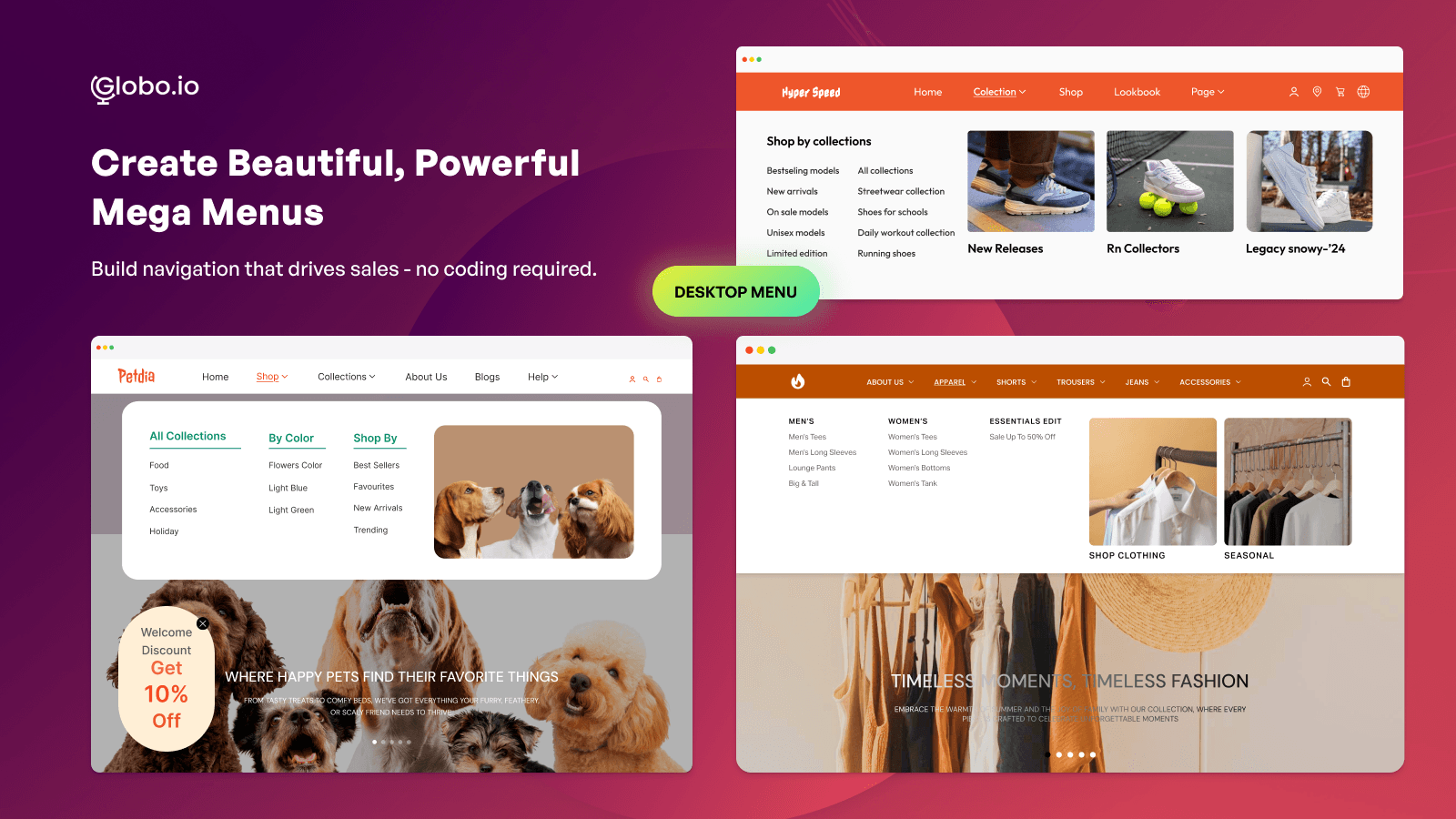
Globo Mega Menu holds 4.9 stars across 1,000+ reviews — the largest review base in the mega menu layer reflecting Globo's broader Shopify ecosystem (Globo Product Filter, Globo Form Builder, Globo Product Options). The positioning is broad mega menu customization with strong free tier from a long-established Shopify vendor: drag-and-drop builder, multi-column layouts with images, mobile-responsive design, conditional display rules, and ecosystem integration with other Globo apps.
The generous free tier matters specifically for stores starting with mega menus. Where Meteor requires paid trials and qikify caps free-tier features, Globo's free plan covers the standard mega menu use cases (basic dropdowns, multi-column layouts, image embeds) without paid commitment — useful for stores validating mega menu impact before scaling to paid tiers.
Core features: drag-and-drop mega menu builder; multi-column dropdowns with images and rich content; mobile-responsive layouts; conditional display rules (show different menus to different customer segments); pre-designed templates; integration with Shopify Online Store 2.0 themes; multi-language support; Globo ecosystem integration; merchant dashboard with menu analytics.
Where it falls short: less polished UI than Meteor or qikify on premium tiers. Some merchant reviews flag occasional sync delays during high-volume catalog updates. Best for stores prioritizing breadth of features over visual polish.
Pricing: Free plan available. Paid plans from $9.90/mo.
3. qikify Smart Menu
Best for: Shopify stores prioritizing page-speed performance and conditional display logic — the performance-focused mega menu pick for stores where storefront speed is a bottleneck.
qikify Smart Menu holds 4.9 stars across 500+ reviews. The differentiating positioning is performance-focused architecture: rather than the heavier JavaScript footprint of Meteor or Globo, qikify uses a lighter rendering approach with lazy-loaded dropdown content (mega menu content loads on hover rather than initial page load) and minimal JavaScript impact on Core Web Vitals. For stores tracking page speed metrics where mega menu apps typically add measurable bloat, qikify's lighter approach delivers comparable functionality with less performance cost.
The conditional display matters specifically for stores serving multiple customer segments. qikify lets merchants show different menus to different segments — wholesale customers see a different navigation than retail, mobile users see a different layout than desktop, geographic regions see localized menu structures. For stores running B2B alongside retail or operating multi-region storefronts, this conditional logic handles segmentation that simpler mega menus require manual workarounds for.
Core features: lightweight mega menu architecture with lazy-loaded content; conditional display rules by customer tag, device, region; multi-column dropdowns with images; sticky header support; mobile-responsive design; integration with Shopify Online Store 2.0 themes; merchant dashboard with performance and menu analytics.
Where it falls short: less drag-and-drop polish than Meteor's visual editor. Setup complexity moderate for stores configuring conditional rules. Smaller installed base than Globo. Best for stores prioritizing performance over editing UX.
Pricing: Free plan available. Paid plans from $9.99/mo.
The Honest Trade-Off: When Mega Menus Don't Earn Their Cost
Worth saying explicitly: most stores don't need a mega menu app. Shopify's native theme navigation handles 80%+ of standard catalog browsing through built-in dropdown menus that themes ship with. For stores with simple catalog structure (under 200 products, 3-5 top-level categories), native dropdowns work fine and a mega menu adds visual complexity without conversion benefit.
The catalog-scale signal is the strongest. Stores with under 200 products typically don't benefit from mega menus because the catalog isn't large enough to justify multi-column dropdown complexity. A boutique apparel store with 80 products serves customers via native dropdowns just fine. Stores with 500+ products across 8+ top-level categories benefit from mega menus because the catalog structure can't be expressed efficiently in simple dropdowns.
The signal that mega menus earn their cost: catalog over 200 products with 5+ top-level categories, customers regularly bouncing from category pages because they couldn't find what they wanted in the native menu, and merchandising opportunities (seasonal collections, featured brands, promotional images within navigation) become a revenue lever. The signal that they're premature: small catalog, simple category structure, and conversion happens primarily through search or direct product links rather than category browsing.
Layer 2: Mobile-First Navigation Apps
This layer is for stores where mobile traffic exceeds 50% of sessions and standard hamburger menu conversion is the bottleneck. The mechanics: bottom tab bars, mobile-optimized menus, persistent navigation that stays visible during scroll, and gesture-based patterns matching native iOS and Android app conventions. The right pick when mobile-heavy traffic isn't being served by desktop-first mega menu approaches. Three apps lead this layer.
4. Buddha Mega Menu Mobile
Best for: Shopify stores wanting established mobile navigation combined with desktop mega menu functionality under one app — the bridge pick covering both desktop and mobile under one subscription.
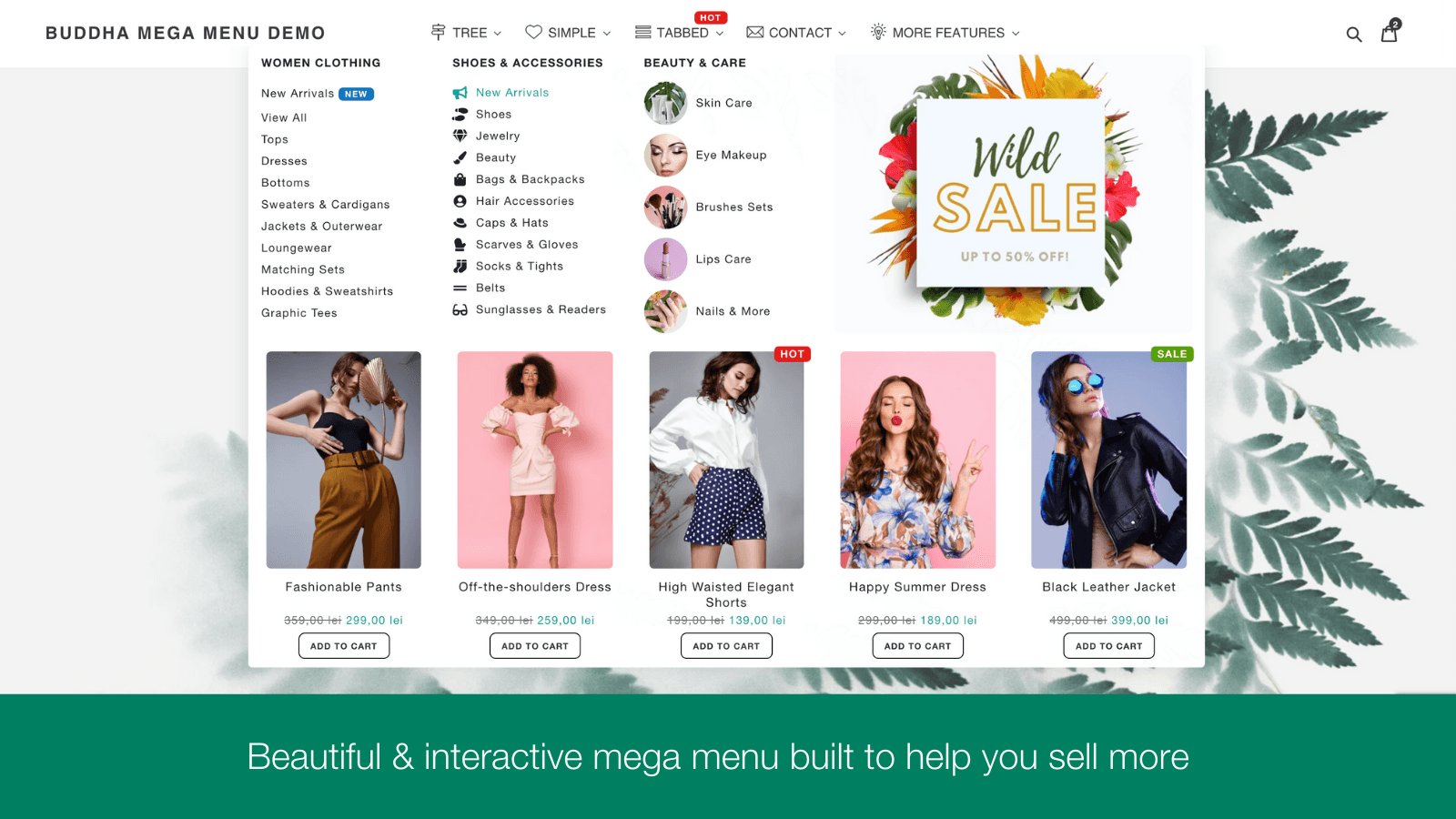
Buddha Mega Menu Mobile holds 4.7 stars across 1,400+ reviews — one of the longest-established navigation apps on Shopify. The positioning combines mega menu functionality (desktop multi-column dropdowns) with mobile-optimized navigation (drawer menus with smooth transitions, accordion expansions, tap-friendly targets) under one platform with consistent styling across both contexts.
The combined positioning matters specifically for stores wanting unified navigation experience without managing separate apps for desktop and mobile. Rather than Meteor for desktop plus Navi+ for mobile, Buddha covers both layers with a shared design language. For stores prioritizing visual consistency between desktop and mobile, this consolidation simplifies design ops.
Core features: desktop mega menu with multi-column dropdowns; mobile-optimized drawer navigation with smooth animations; consistent styling across desktop and mobile; pre-designed templates; mobile accordion menus with tap-friendly targets; integration with Shopify Online Store 2.0 themes; merchant dashboard with navigation analytics.
Where it falls short: 4.7-star rating reflects more polish gaps than 4.9-rated alternatives. Less specialized in mobile-specific patterns (bottom tab bars, gesture navigation) than Navi+ TabBar. Some merchant reviews flag occasional theme compatibility friction on customized themes.
Pricing: Free plan available. Paid plans from $9.99/mo.
5. Navi+ TabBar & Bottom Bar
Best for: mobile-heavy Shopify stores wanting native-app-style bottom tab bars with persistent navigation that stays visible during scroll — the dedicated mobile navigation pick for stores with 60%+ mobile traffic.
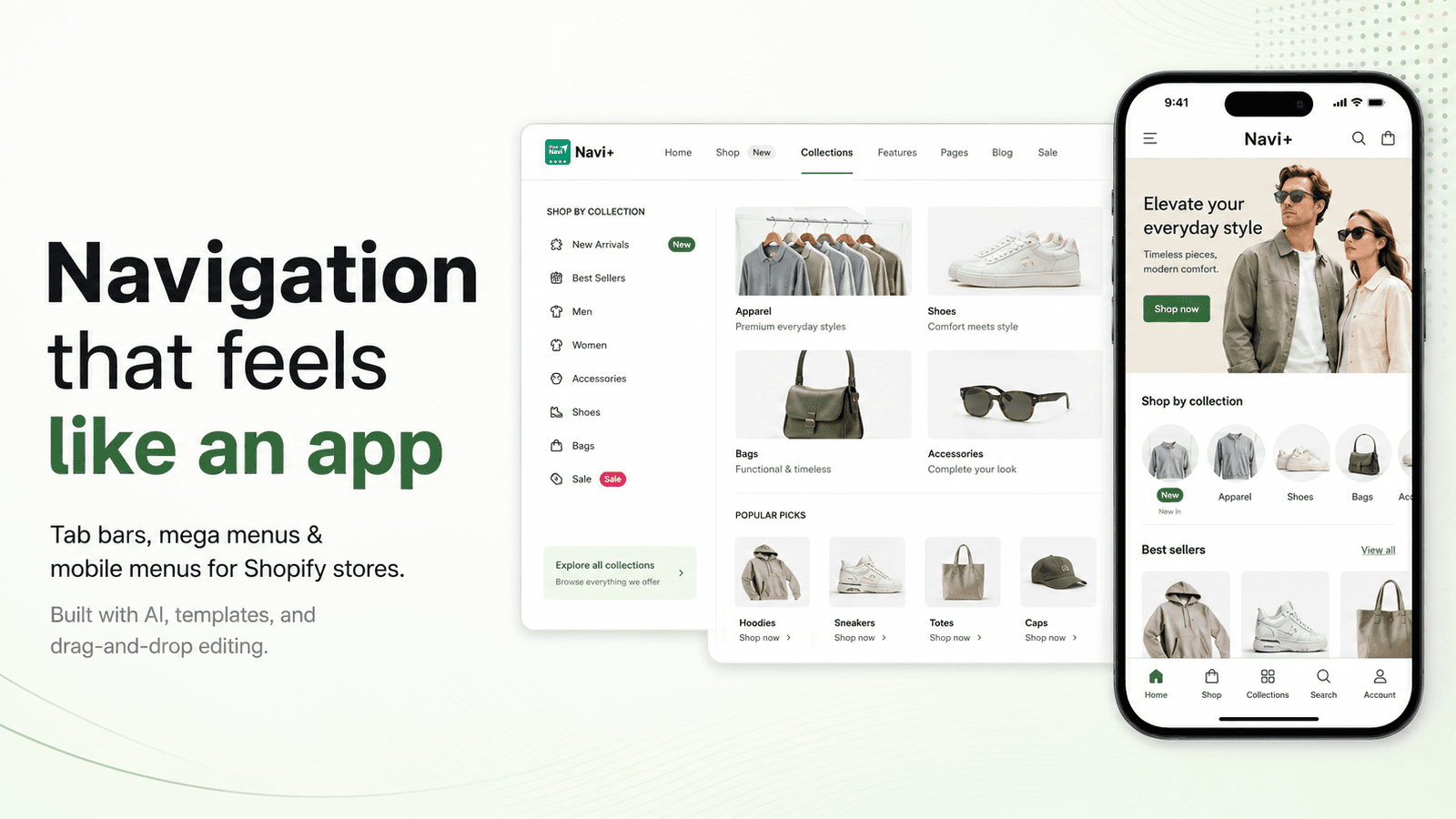
Navi+ TabBar & Bottom Bar holds 4.9 stars across 300+ reviews. The differentiating positioning is bottom tab bar mechanics: rather than hiding navigation behind a hamburger menu (the default Shopify mobile pattern), Navi+ adds a persistent bottom navigation bar with 4-5 tap targets that stays visible during scroll — matching the navigation pattern customers already know from Instagram, TikTok, Amazon, and major mobile apps.
The bottom tab bar pattern matters specifically for mobile conversion. Standard hamburger menus require a tap to access (then tap again to select destination); bottom tab bars deliver one-tap navigation to primary destinations (Home, Categories, Cart, Account, Search). For mobile-heavy stores, this single change typically delivers 15-25% mobile conversion lift versus standard hamburger navigation because navigation friction drops dramatically.
Core features: bottom tab bar with 4-5 customizable tap targets; persistent navigation that stays visible during scroll; mobile-app-style icons and labels; mega menu support for desktop; conditional display by device, customer tag, or page; brand-aligned styling; integration with Shopify Online Store 2.0 themes; merchant dashboard with mobile-specific conversion analytics.
Where it falls short: smaller installed base than Buddha or Meteor. Bottom tab bar mechanics are mobile-only — doesn't replace desktop navigation, so stores with 50/50 traffic split still need a separate desktop mega menu. Setup complexity moderate for stores configuring conditional display rules.
Pricing: Free plan available. Paid plans from $7.95/mo.
6. AAAeCommerce Mobile Menu
Best for: Shopify stores wanting comprehensive native-app-style mobile navigation overhaul — the deepest mobile-specific pick for stores treating mobile UX as a primary investment area.
AAAeCommerce Mobile Menu holds 4.8 stars across 200+ reviews. The positioning is comprehensive native-app-style mobile navigation: bottom tab bars, swipe gestures, hamburger replacement with sliding drawers, mobile-optimized search with voice input, and overall mobile UX patterns that match native iOS and Android app expectations. For stores treating mobile experience as the primary investment area rather than a secondary consideration, this depth handles mobile UX in ways general navigation apps don't.
The native app-style positioning matters specifically for stores converting from progressive web app frameworks or building toward mobile-app-like experiences. Rather than Shopify's standard mobile patterns (which feel like a website on mobile), AAAeCommerce delivers patterns that feel like a native app — bottom navigation, swipe gestures, smooth transitions, mobile-app-style search and filter UX.
Core features: bottom tab bar with multi-tab navigation; swipe gestures for collection browsing; native-app-style menu drawers; voice-input mobile search; mobile-optimized filter and search UX; offline-capable navigation patterns; brand-aligned styling; integration with Shopify Online Store 2.0 themes; merchant dashboard with mobile analytics.
Where it falls short: pricing entry point ($9.99/mo) higher than Navi+ TabBar's $7.95/mo for stores wanting only bottom tab bar functionality. Setup complexity is real for stores configuring comprehensive mobile UX patterns. Smaller installed base than Buddha. Best for stores making mobile UX a primary investment rather than incremental improvement.
Pricing: Free trial. Paid plans from $9.99/mo.
Layer 3: Native + Lightweight Navigation Enhancement
This layer extends Shopify's built-in navigation with focused enhancements at lower cost than full mega menu rebuilds. The mechanics: app uses theme navigation as the base and adds breadcrumbs, sticky headers, sidebar collection navigation, and basic dropdown styling without replacing the underlying menu structure. The right pick when catalog scale doesn't justify mega menus and mobile traffic isn't dominant. Two apps lead this layer.
7. Stilio Mega Menu
Best for: small-to-mid Shopify stores wanting lightweight mega menu functionality at the lowest entry pricing in this category — the budget mega menu pick.
Stilio Mega Menu holds 4.9 stars across 300+ reviews. The positioning is focused lightweight mega menu functionality at the lowest entry tier in the broader navigation category ($4.99/mo): basic multi-column dropdowns with images, mobile-responsive design, simple drag-and-drop configuration, and integration with Shopify Online Store 2.0 themes. For stores wanting mega menu functionality without the broader feature sets and pricing of Meteor or Globo, Stilio covers the standard use case at meaningfully lower cost.
The narrow scope is the strength. Where Meteor bundles advanced templates and Globo bundles ecosystem integration, Stilio focuses on basic mega menu mechanics and ships at $4.99/mo entry tier. For stores starting with mega menus or running tight app budgets, this is the right pick.
Core features: basic multi-column dropdowns; image embeds within dropdowns; mobile-responsive layouts; drag-and-drop configuration; integration with Shopify Online Store 2.0 themes; multi-language support; merchant dashboard with menu analytics.
Where it falls short: smaller feature set than Meteor or Globo — fewer templates, simpler conditional logic, less customization depth. Smaller installed base than category leaders. Best for budget-conscious stores rather than mature programs needing comprehensive features.
Pricing: Free plan available. Paid plans from $4.99/mo.
8. EasyNav: Sticky Sidebar Nav
Best for: Shopify stores wanting sticky sidebar navigation, breadcrumbs, and page anchors — the focused sidebar-and-breadcrumb pick for content-heavy stores and long product pages.
EasyNav: Sticky Sidebar Nav holds 4.9 stars across 200+ reviews. The differentiating positioning is sidebar and breadcrumb navigation rather than mega menu mechanics: sticky sidebar that follows scroll on long product or collection pages, automatic breadcrumb generation showing customer location in catalog hierarchy, page anchor links for navigating long pages (FAQ sections, product specs, reviews), and table of contents for content-heavy pages. For stores with long product pages (detailed specs, extensive product descriptions, FAQs) or content-heavy collection pages, this navigation pattern handles use cases mega menus don't address.
The breadcrumb auto-generation matters specifically for SEO. Breadcrumbs help Google understand site structure and improve rankings on category-based searches — EasyNav's automatic breadcrumb generation handles SEO breadcrumb schema markup without manual theme code edits. Combined with the sticky sidebar that improves long-page UX, EasyNav delivers focused navigation enhancements that complement (rather than replace) mega menus.
Core features: sticky sidebar navigation with scroll tracking; automatic breadcrumb generation with SEO schema; page anchor links for long pages; table of contents for content pages; brand-aligned styling; integration with Shopify Online Store 2.0 themes; merchant dashboard with navigation analytics.
Where it falls short: not a mega menu replacement — stores wanting multi-column dropdowns need a Layer 1 or Layer 2 app alongside EasyNav. Smaller installed base than category leaders. Best as a complement to mega menu apps rather than a standalone navigation solution.
Pricing: Free plan available. Paid plans from $4.99/mo.
Which Navigation App to Choose
For most-installed mega menu builder with drag-and-drop and broad theme compatibility: Meteor Mega Menu. 4.9 stars, 700+ reviews, $13.99/mo entry, the default mega menu pick for stores with desktop catalog complexity.
For largest review base with generous free tier: Globo Mega Menu. 4.9 stars, 1,000+ reviews, $9.90/mo entry, the broad-customization mega menu pick.
For performance-focused mega menu with conditional display logic: qikify Smart Menu. 4.9 stars, 500+ reviews, the page-speed-conscious mega menu pick.
For established mobile navigation combined with desktop mega menu under one app: Buddha Mega Menu Mobile. 4.7 stars, 1,400+ reviews, the unified desktop-plus-mobile pick.
For dedicated bottom tab bars and native-app-style mobile navigation: Navi+ TabBar & Bottom Bar. 4.9 stars, $7.95/mo entry, the dedicated mobile navigation pick for stores with 60%+ mobile traffic.
For comprehensive native-app-style mobile UX overhaul: AAAeCommerce Mobile Menu. 4.8 stars, the deepest mobile-specific pick for mobile-prioritized stores.
For lightweight mega menu functionality at lowest entry pricing: Stilio Mega Menu. 4.9 stars, $4.99/mo, the budget mega menu pick.
For sticky sidebar navigation, breadcrumbs, and page anchors: EasyNav: Sticky Sidebar Nav. 4.9 stars, $4.99/mo, the focused sidebar-and-breadcrumb pick.
For most Shopify stores in this category, the honest framing is traffic-composition-first. Stores with majority desktop traffic and 200+ products in 5+ categories install Layer 1 (Meteor, Globo, qikify). Stores with 60%+ mobile traffic install Layer 2 (Navi+ TabBar, AAAeCommerce, Buddha for combined). Stores with simple catalog structure or content-heavy product pages install Layer 3 (Stilio for budget mega menu, EasyNav for sidebar/breadcrumbs). The most common navigation mistake is investing only in desktop mega menus when mobile is the dominant traffic source — match the app to where traffic actually comes from.
How We Ranked These Apps
This ranking is based on four criteria applied to every Shopify navigation app tested in 2026. First, Shopify App Store rating and verified review volume as of April 30, 2026 — the strongest signal of long-term merchant satisfaction at scale. Second, fit-to-job for which of the three layers each app actually solves (mega menu builders, mobile-first navigation, or native enhancement) rather than treating these as a single category. Third, pricing structure and total cost at realistic merchant volumes — a $4.99/mo lightweight mega menu and a $13.99/mo full-featured mega menu handle different scopes, and the math depends on which layer the store actually needs based on catalog complexity and traffic composition. Fourth, traffic-composition fit, since merchant satisfaction depends on whether the app addresses the actual conversion bottleneck (mega menu wasted on mobile-heavy traffic, mobile tab bar wasted on desktop-heavy traffic).
Every pricing and feature figure in this post was verified directly from each app's live Shopify App Store listing on April 30, 2026. App pricing structures change — always confirm current pricing on the official listing before installing. Ratings and review counts reflect the Shopify App Store at the time of our last update.
Frequently Asked Questions
What is a Shopify navigation app?
A Shopify navigation app handles one of three distinct jobs. Mega menu builders (Meteor, Globo, qikify) handle desktop header navigation with multi-column dropdowns, image promotions, and structured catalog browsing. Mobile-first navigation apps (Buddha, Navi+, AAAeCommerce) build bottom tab bars and mobile-optimized menus replacing standard hamburger menus. Native enhancement apps (Stilio, EasyNav) extend Shopify's built-in navigation with breadcrumbs, sticky headers, and sidebar nav at lower cost.
What is the best Shopify navigation app in 2026?
Depends on the layer. For mega menu: Meteor Mega Menu (4.9 stars, 700+ reviews, most-installed) or Globo Mega Menu (4.9 stars, 1,000+ reviews, largest base). For mobile-first: Navi+ TabBar (bottom tab bar at $7.95/mo) or Buddha Mega Menu Mobile (combined desktop+mobile). For native enhancement: Stilio Mega Menu ($4.99/mo budget) or EasyNav (sidebar/breadcrumbs). Pick the layer first based on catalog scale and traffic composition.
How much do Shopify navigation apps cost?
Entry tiers range from free (most apps offer free plans) to $4.99-9.99/mo for most paid plans. Premium mega menu builders run $13.99-29.99/mo. Specialized mobile-first apps run $7.95-12.99/mo. The right app costs less than $20/mo for most stores once the actual navigation bottleneck is identified.
Does Shopify support mega menus natively?
Partially. Most modern Shopify themes (Dawn, Sense, Refresh, Studio) ship with basic dropdown navigation that handles 1-2 levels of nesting. Native dropdowns work fine for stores with under 200 products and 3-5 top-level categories. For stores with larger catalogs needing multi-column layouts, image promotions, and merchandising blocks within dropdowns, third-party mega menu apps extend native navigation with these capabilities.
What is the difference between mega menus and mobile navigation?
Different mechanics for different devices. Mega menus optimize desktop browsing with multi-column dropdowns showing catalog structure visually. Mobile navigation apps optimize mobile browsing with bottom tab bars, persistent navigation, and gesture-based patterns matching native app conventions. Most stores need both layers if traffic is split between desktop and mobile — a desktop-focused mega menu without mobile optimization leaves 50-70% of traffic underserved.
What is a bottom tab bar?
A bottom tab bar is a persistent navigation bar at the bottom of the mobile viewport with 4-5 customizable tap targets that stay visible during scroll. The pattern matches navigation customers know from Instagram, TikTok, Amazon, and other major mobile apps. For mobile-heavy Shopify stores, bottom tab bars typically deliver 15-25% mobile conversion lift versus standard hamburger menus because navigation friction drops dramatically — one tap to navigate versus two taps (open hamburger then select destination).
When does a mega menu earn its cost?
Catalog scale is the strongest signal. Stores with under 200 products typically don't need mega menus because the catalog isn't large enough to justify multi-column dropdown complexity. Stores with 500+ products across 8+ top-level categories benefit because the catalog structure can't be expressed efficiently in simple dropdowns. The signal: customers regularly bouncing from category pages because they couldn't find what they wanted, and merchandising opportunities (seasonal collections, featured brands) become a revenue lever.
Should I optimize for desktop or mobile navigation?
Wherever traffic actually comes from. Most Shopify stores see 60-70% mobile traffic, which makes mobile navigation the higher-impact investment. A $9/mo bottom tab bar that improves mobile browsing for 60-70% of traffic typically delivers more revenue lift than a $29/mo desktop mega menu that improves browsing for 30-40% of traffic. Check Google Analytics or Shopify analytics for actual traffic split before deciding which layer to invest in first.
What are breadcrumbs and why do they matter?
Breadcrumbs are navigation links showing customer location in the catalog hierarchy (Home > Women > Dresses > Cocktail Dresses). They help customers navigate back up the hierarchy without using the browser back button and help Google understand site structure for SEO. EasyNav and similar apps automatically generate breadcrumbs with SEO schema markup. For SEO-conscious stores, breadcrumbs typically deliver 5-10% organic traffic lift on category-based searches.
Will navigation apps slow down my Shopify store?
Modern navigation apps load asynchronously with minimal page-speed impact — dropdown content typically loads on hover rather than initial page load. The exception: heavy mega menu builders with extensive JavaScript can add measurable overhead, especially on themes with already heavy script footprints. qikify Smart Menu specifically positions on performance optimization. Always test page speed before and after install with Google PageSpeed Insights to confirm impact on your specific theme.
Think Your App Belongs on This List?
We update these lists as new tools launch and existing ones improve. If you are a developer building a Shopify navigation, mega menu, or mobile UX app and want your app considered for inclusion, submit it here — tell us what your app does, who it is for, and include a link to your Shopify App Store listing. We review every submission.