
8 Best Shopify Store Performance Optimization Apps (2026)
Last updated: April 2026 · Pricing and ratings verified from live Shopify App Store listings on April 30, 2026. Reviewed by the Libautech team — builders of Built for Shopify apps used by 5,000+ merchants across 50+ countries.
Key Takeaways
- Shopify performance apps split into three distinct jobs that competitor blogs treat as one. Image optimization apps (TinyIMG, Crush Pics, Hyperspeed) compress images, generate WebP/AVIF versions, and add lazy loading. Page speed apps (Booster, RoarTheme, LoadBoost) handle preloading, caching strategies, and Core Web Vitals improvements. Theme/code optimization apps (NitroPack, SwiftSpeed) minify JS/CSS, defer non-critical scripts, and reduce third-party app bloat.
- Shopify already handles most performance optimization natively. Their CDN runs across 200+ edge locations globally, automatic image WebP conversion has shipped since 2023, automatic JS bundling reduces request count, and Online Store 2.0 themes ship with lazy loading by default. Most stores see 70-80% of optimization benefits from Shopify's native infrastructure before installing any third-party app.
- The biggest performance issue on most Shopify stores is third-party app bloat, not missing optimization. Each installed app adds JavaScript that loads on every page — a store running 15-20 apps typically loads 2-5MB of JS before any optimization app can help. Removing unused apps delivers more performance lift than installing a new optimization app.
- Core Web Vitals (LCP, INP, CLS) are the metrics that matter for SEO ranking. Google uses these as ranking signals — a Shopify store with LCP under 2.5s, INP under 200ms, and CLS under 0.1 ranks meaningfully better than competitors with poor scores. Performance apps that improve these specific metrics earn their cost; apps that improve metrics Google doesn't measure (vague "page speed score") deliver less SEO value.
- Pricing in this category is exceptionally accessible. Most performance apps offer free tiers and paid plans starting at $4.99-9.99/mo. Premium apps with comprehensive features run $19-49/mo. Enterprise platforms like NitroPack scale higher. The right app costs less than $20/mo for most stores once the actual bottleneck is identified.
- The biggest performance-app mistake is installing one without measuring first. PageSpeed Insights and Google Search Console show specific bottlenecks (image weight, render-blocking JS, layout shifts) — install the app that addresses the actual measured issue rather than the app with the strongest marketing claims about "making your store faster."
Who Needs a Performance App, and Why?
A performance app speeds up your store by compressing images, lazy-loading assets and trimming code, which improves load time and Core Web Vitals. Faster pages convert better and rank better, so speed work pays back in both sales and SEO.
You need one if your store is slow, scores poorly on PageSpeed Insights, or carries heavy images and apps. A lean, fast store on a modern theme may not need much.
The Three Jobs of Shopify Performance Apps
Most roundups of Shopify performance apps lump together image optimization, page speed acceleration, and code/theme optimization as if they're solving the same problem. They are not. An image optimization app compresses images, converts to WebP/AVIF, and adds lazy loading. A page speed app handles preloading strategies, caching, and Core Web Vitals improvements at the network level. A theme/code optimization app minifies JavaScript and CSS, defers non-critical scripts, and reduces the impact of third-party app bloat. Different mechanics, different bottlenecks being solved, different cost structures.
The honest framing: Shopify performance apps break into three distinct jobs. Most stores need exactly one based on their actual measured bottleneck — picking the wrong type means installing an image optimizer when the real problem is render-blocking JavaScript, or installing a code optimizer when the real problem is bloated images.
The first job is image optimization — compressing image file sizes, converting to modern formats (WebP, AVIF), generating responsive image sets, and adding lazy loading for below-fold images. The mechanics: app processes existing product images and theme images in bulk, generates optimized versions, and updates Shopify's image references. TinyIMG, Crush Pics, and Hyperspeed lead this layer. The right pick when PageSpeed Insights flags large image payload as the primary bottleneck — typically stores with high-resolution product photography or extensive content imagery.
The second job is page speed acceleration — preloading, caching strategies, Core Web Vitals improvements (LCP, INP, CLS), and network-level optimizations. The mechanics: app intercepts page rendering to preload likely-next pages, caches aggressively, and optimizes critical rendering path. Booster Page Speed Optimizer, RoarTheme Speed Optimizer, and LoadBoost lead this layer. The right pick when stores want overall page-load improvements rather than specific image or code fixes.
The third job is theme and code optimization — minifying JavaScript and CSS, deferring non-critical scripts, removing render-blocking resources, and managing the JavaScript bloat that accumulates from third-party apps. The mechanics: app analyzes installed JavaScript on each page, defers non-essential scripts to fire after page interactivity, and minifies/combines remaining files. NitroPack and SwiftSpeed lead this layer. The right pick for stores with 10+ installed apps where JS bloat is the measured bottleneck.
This post ranks 8 apps across the three jobs based on verified April 2026 Shopify App Store data and what each one actually solves.
Performance apps stack with broader operational tools. See our guides on best Shopify image editor apps for the broader image-handling layer that complements optimization, best Shopify design customization apps for the related theme-customization layer where performance and design intersect, and best Shopify search filter apps for the related collection-page performance layer.
Quick Comparison: 8 Best Shopify Performance Apps (2026)
| App | Rating | Free Plan | Paid From | Layer | Best For |
|---|---|---|---|---|---|
| TinyIMG SEO & Image Optimizer | ⭐ 4.9 (1,800+) | Yes | $4.99/mo | Image optimization | Most-installed image optimizer with SEO bundle |
| Crush Pics: Image Optimizer | ⭐ 4.9 (1,000+) | Yes | $4.99/mo | Image optimization | Established image compression with auto-pilot mode |
| Hyperspeed: Page Speed Booster | ⭐ 4.8 (300+) | Yes | $9.95/mo | Image optimization | Image compression + lazy loading + WebP |
| Booster: Page Speed Optimizer | ⭐ 4.7 (700+) | Yes | $9.99/mo | Page speed | Browser preloading for instant page loads |
| RoarTheme Speed Optimizer | ⭐ 4.9 (200+) | Yes | $9.99/mo | Page speed | Core Web Vitals focused, theme-aware optimization |
| LoadBoost: Page Speed Optimizer | ⭐ 4.8 (150+) | Yes | $7.99/mo | Page speed | Affordable speed optimization with caching |
| NitroPack: Site Speed | ⭐ 4.7 (200+) | Free trial | $21/mo | Theme/code | Comprehensive code minification + caching |
| SwiftSpeed Page Speed Optimizer | ⭐ 4.8 (200+) | Yes | $11.99/mo | Theme/code | JS deferral, third-party script management |
Layer 1: Image Optimization Apps
This layer is for stores where PageSpeed Insights flags large image payload as the primary bottleneck — typically stores with high-resolution product photography, extensive content imagery, or older themes that don't ship native lazy loading. The mechanics: app processes existing product images and theme images in bulk, generates optimized versions (compressed JPG/PNG plus WebP/AVIF alternates), and updates Shopify's image references. Three apps lead this layer.
1. TinyIMG SEO & Image Optimizer
Best for: Shopify stores wanting the most-installed image optimizer on the App Store with SEO bundle features (sitemap optimization, JSON-LD schema, broken link detection) under one app.
TinyIMG holds 4.9 stars across 1,800+ reviews — the dominant image optimizer on Shopify with one of the largest review bases in the broader performance category. The positioning is comprehensive: image compression and WebP conversion plus a bundled SEO toolkit (alt text generation, sitemap optimization, JSON-LD schema injection, broken link detection, redirect management). For stores wanting both image optimization and basic SEO tooling under one app rather than maintaining two separate apps, TinyIMG handles both jobs at competitive pricing.
The bundled SEO toolkit matters specifically for stores not running dedicated SEO apps. The alt text auto-generation handles the most common Shopify SEO gap (product images shipped without alt text), JSON-LD schema injection helps Google understand product pricing and availability, and the broken link detector catches 404s before they hurt rankings. For stores where SEO and performance are both priorities but neither warrants a $30+/mo dedicated app, TinyIMG covers both for $4.99-29/mo.
Core features: bulk image compression with quality controls; WebP and AVIF format conversion; lazy loading for below-fold images; auto-generated alt text for SEO; sitemap optimization with priority and frequency settings; JSON-LD schema injection for products and articles; broken link detection with redirect management; image scaling for responsive themes; integration with Shopify Online Store 2.0 themes; merchant dashboard with optimization analytics.
Where it falls short: bundled SEO features are shallower than dedicated SEO apps (Plug In SEO, Smart SEO) for stores running mature SEO programs. Some merchant reviews flag occasional UI complexity from the broad feature scope. Pricing scales with image volume on premium tiers — stores with very large catalogs (10,000+ images) face significant costs.
Pricing: Free plan available. Paid plans from $4.99/mo.
2. Crush Pics: Image Optimizer
Best for: established Shopify stores wanting focused image optimization with auto-pilot mode — install once, configure compression rules, and let the app process new uploads automatically without ongoing intervention.
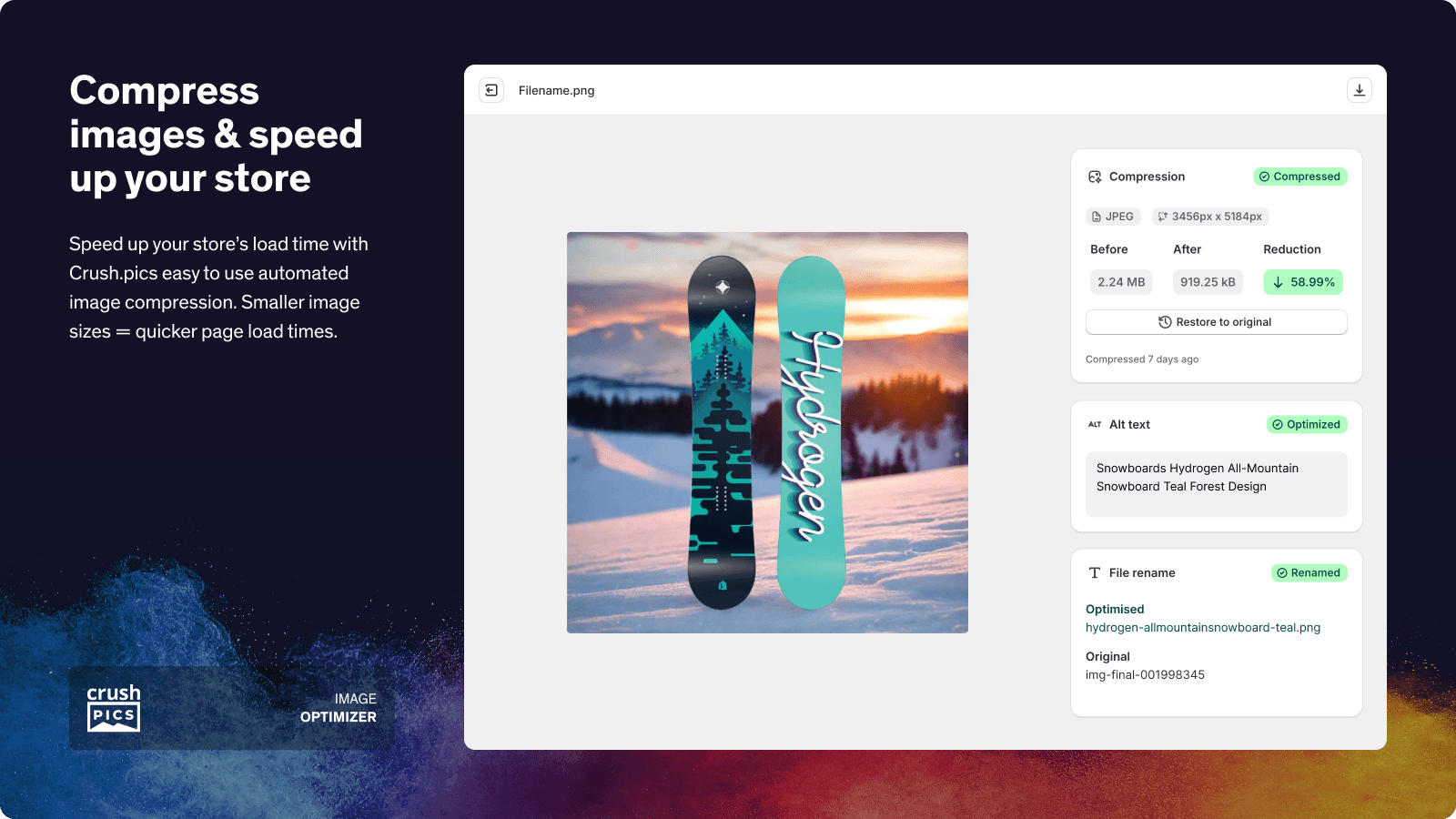
Crush Pics holds 4.9 stars across 1,000+ reviews. The positioning is established image compression with the strongest auto-pilot mode in the layer: rather than requiring merchants to manually trigger compression on each new product upload, Crush Pics watches for new images uploaded to the store and processes them automatically based on merchant-defined rules (compression level, format conversion, resize targets). For stores adding 50+ products per month, this hands-off workflow eliminates the operational overhead of remembering to optimize new uploads.
The narrow scope is the strength. Where TinyIMG bundles SEO features that some stores never use, Crush Pics focuses on image optimization specifically and ships at the same $4.99/mo entry tier. For stores with dedicated SEO tooling already in place, Crush Pics' focused approach delivers deeper image-specific functionality without paying for SEO features running elsewhere.
Core features: bulk image compression with three quality presets (lossless, balanced, aggressive); WebP and AVIF format conversion; auto-pilot mode for new uploads; backup and restore for original images; alt text editing for SEO; image rename and resize tools; integration with Shopify Online Store 2.0 themes; merchant dashboard with compression savings analytics.
Where it falls short: no broader SEO tooling like TinyIMG's sitemap and schema features. Smaller installed base than TinyIMG. Best for stores with focused image-only optimization needs rather than bundled SEO+performance approach.
Pricing: Free plan available. Paid plans from $4.99/mo.
3. Hyperspeed: Page Speed Booster
Best for: Shopify stores wanting image compression combined with lazy loading and basic page-speed optimizations under one mid-tier app — the bridge between pure image optimization and dedicated speed acceleration.
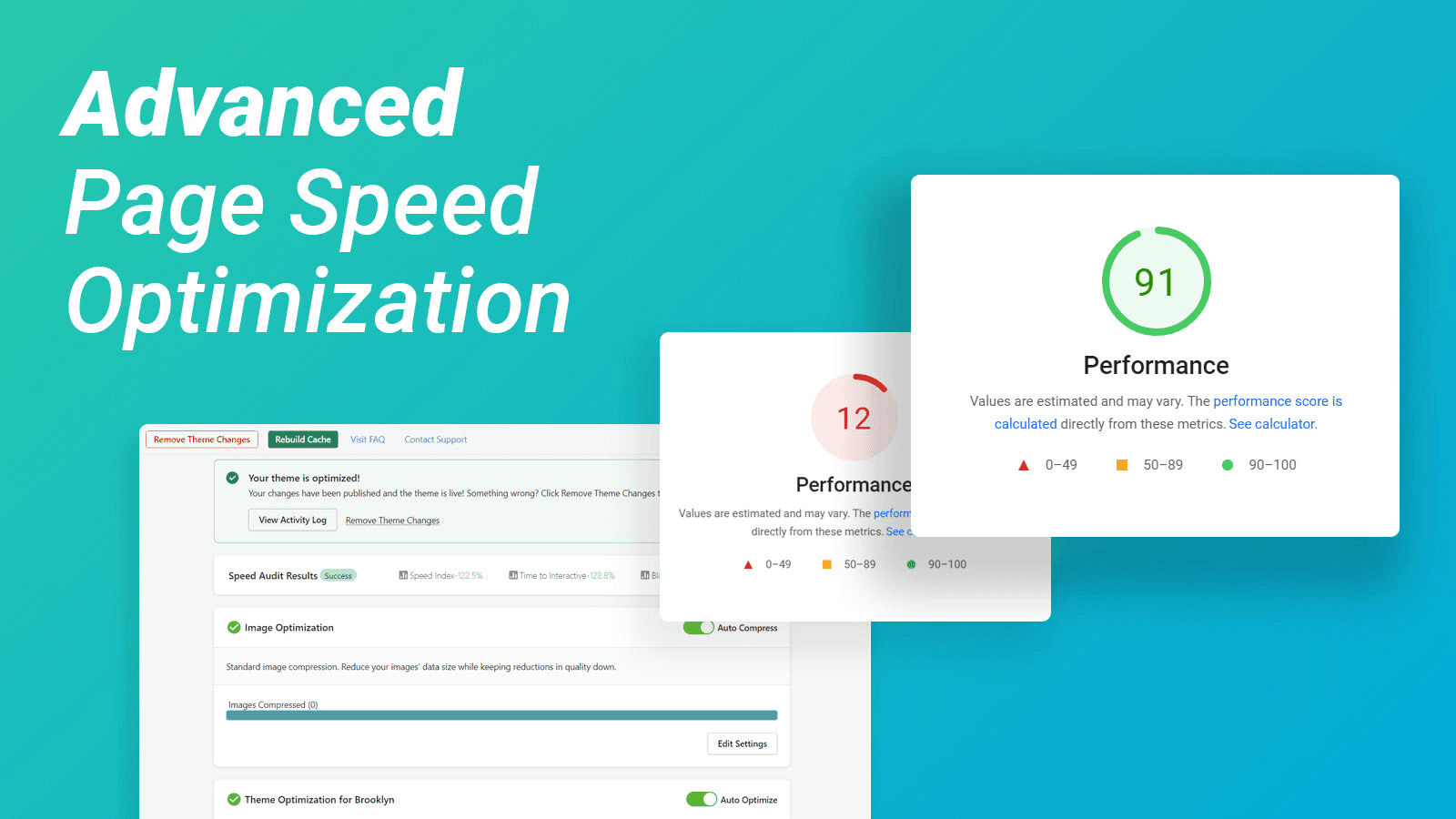
Hyperspeed holds 4.8 stars across 300+ reviews. The positioning bridges image optimization and basic page-speed acceleration: the core feature set is image compression plus WebP conversion, but Hyperspeed adds lazy loading for below-fold content (images, videos, iframes) and basic JavaScript deferral that goes beyond pure image-only apps. For stores where PageSpeed Insights flags both image weight and render-blocking content as bottlenecks, Hyperspeed handles both in one app rather than stacking two separate optimization apps.
The broader feature set matters specifically for stores with mid-range performance issues. Pure image optimizers (TinyIMG, Crush Pics) help when image weight is the only problem; dedicated speed apps (Booster, NitroPack) help when JS or rendering is the only problem; Hyperspeed handles the common case where both are problems but neither severely.
Core features: image compression with quality controls; WebP and AVIF format conversion; lazy loading for below-fold images, videos, iframes; basic JavaScript deferral for render-blocking scripts; preloading for critical resources; integration with Shopify Online Store 2.0 themes; merchant dashboard with performance analytics.
Where it falls short: pricing entry point ($9.95/mo) higher than pure image optimizers (TinyIMG, Crush Pics at $4.99/mo). Image-specific features less polished than TinyIMG's bundled SEO. Speed-specific features less comprehensive than NitroPack or RoarTheme Speed Optimizer. Best for stores wanting a middle-ground app rather than specialized depth.
Pricing: Free plan available. Paid plans from $9.95/mo.
The Honest Trade-Off: Shopify's Native Performance Stack
Worth saying explicitly: Shopify already does most performance optimization natively, and most stores see 70-80% of optimization benefits before installing any third-party app. Shopify's CDN runs across 200+ edge locations globally with automatic image caching. Automatic WebP conversion has shipped since 2023 — Shopify serves WebP versions of product images to compatible browsers without merchant configuration. Automatic JS bundling reduces total request count. Online Store 2.0 themes ship with native lazy loading for below-fold images.
The math: a store on a modern Online Store 2.0 theme with reasonable image hygiene (no 4MB hero images, no uncompressed product photography) typically scores 70-90 on PageSpeed Insights without any optimization app installed. Adding a third-party optimizer might lift the score 5-15 points, often at the cost of theme conflicts that introduce new issues.
The biggest performance issue on most Shopify stores is third-party app bloat, not missing optimization. Each installed app adds JavaScript that loads on every page — a store running 15-20 apps typically loads 2-5MB of JS before any optimization app can help. Removing one unused review widget app (which loads 200-400KB of JS on every page) often delivers more performance lift than installing a $20/mo speed optimizer.
The signal that performance apps earn their cost: PageSpeed Insights flags specific bottlenecks (image weight, render-blocking JS, layout shifts) that the merchant's theme alone can't fix. The signal that they don't earn their cost: PageSpeed Insights scores 80+ already, and the bottleneck is total app count rather than per-app efficiency.
Layer 2: Page Speed Acceleration Apps
This layer is for stores wanting overall page-load improvements rather than specific image or code fixes — preloading strategies, caching, Core Web Vitals improvements (LCP, INP, CLS), and network-level optimizations. The mechanics: app intercepts page rendering to preload likely-next pages, caches aggressively at the browser level, and optimizes the critical rendering path. Three apps lead this layer.
4. Booster: Page Speed Optimizer
Best for: Shopify stores wanting the simplest one-click page-speed installation with browser preloading technology — the right pick when stores want a hands-off speed app without configuration overhead.
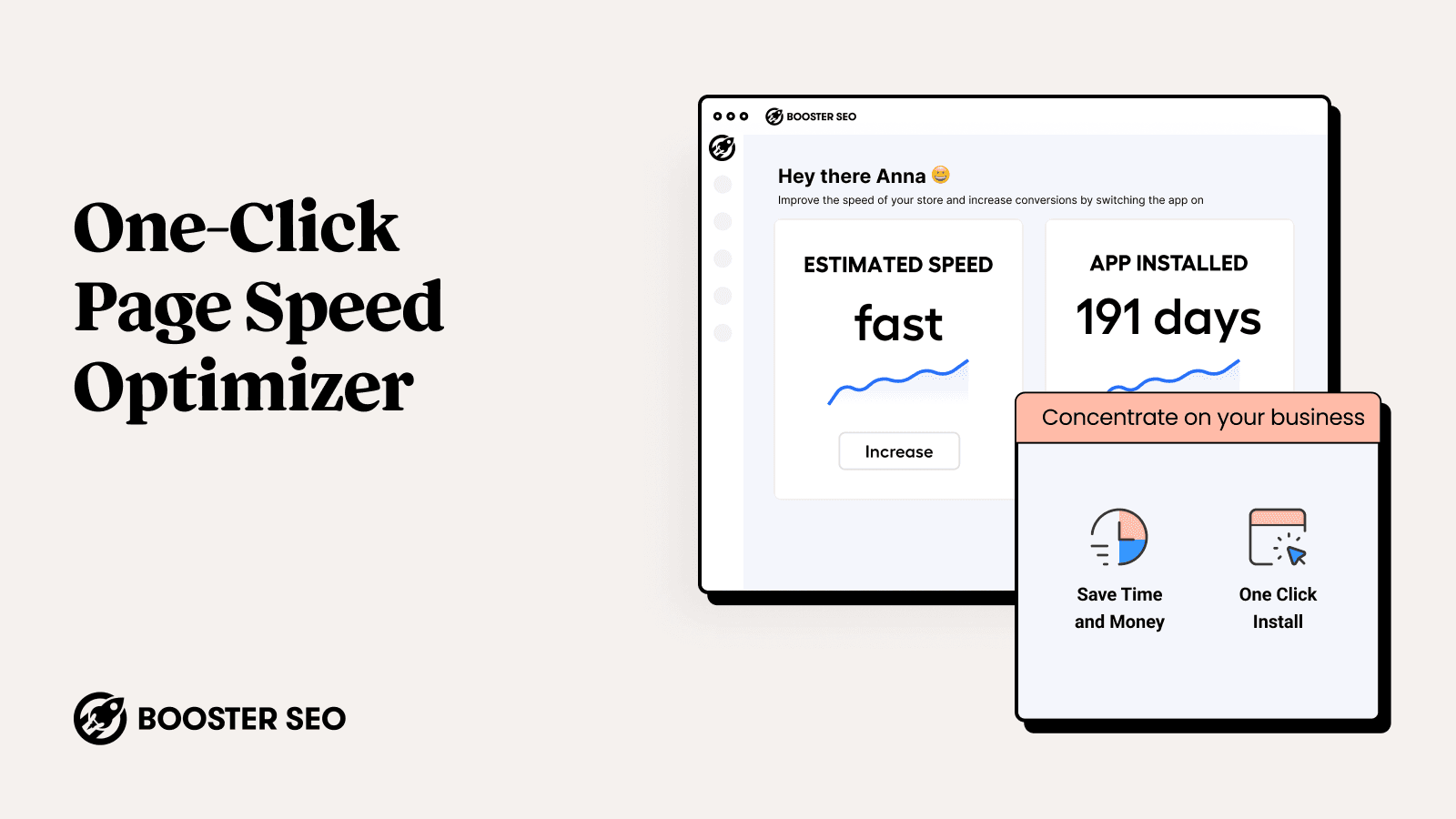
Booster Page Speed Optimizer holds 4.7 stars across 700+ reviews. The positioning is the simplest possible installation: one-click activation, browser preloading technology that fetches likely-next pages before customers click, and zero merchant-side configuration. For stores wanting a speed app without spending hours on setup, Booster's hands-off approach delivers measurable improvement on first install.
The browser preloading mechanic matters specifically for browsing-heavy stores. When a customer hovers over a product link or moves toward navigation, Booster preloads that page in the background — by the time the customer clicks, the page is already loaded and renders instantly. For collection pages, blog posts, and category navigation, this preloading delivers the perceived-speed lift that customers actually notice.
Core features: browser preloading technology with hover-based prefetching; one-click activation with no merchant configuration; basic image lazy loading; integration with Shopify Online Store 2.0 themes; merchant dashboard with preloading analytics; customizable preload triggers.
Where it falls short: 4.7-star rating reflects more polish gaps than 4.9-rated alternatives — some merchant reviews flag occasional preloading conflicts with cart and checkout pages. Less comprehensive than RoarTheme Speed Optimizer or NitroPack. Best for stores wanting simplicity over depth.
Pricing: Free plan available. Paid plans from $9.99/mo.
5. RoarTheme Speed Optimizer
Best for: Shopify stores wanting Core Web Vitals-focused optimization with theme-aware customization — the right pick for stores tracking specific PageSpeed Insights metrics rather than general "speed" improvements.
RoarTheme Speed Optimizer holds 4.9 stars across 200+ reviews. The differentiating positioning is Core Web Vitals focus: rather than generic "page speed" improvements, RoarTheme specifically targets the three metrics Google uses for search ranking (LCP — Largest Contentful Paint, INP — Interaction to Next Paint, CLS — Cumulative Layout Shift) with theme-aware optimizations that respect the specific theme architecture rather than applying generic speed tricks that conflict with theme code.
The Core Web Vitals targeting matters specifically for SEO-conscious stores. Google uses these metrics as ranking signals — a Shopify store with LCP under 2.5s, INP under 200ms, and CLS under 0.1 ranks meaningfully better than competitors with poor scores. Apps that improve these specific metrics earn their cost; apps that improve metrics Google doesn't measure (vague "page speed score") deliver less SEO value.
Core features: Core Web Vitals optimization (LCP, INP, CLS); theme-aware optimization for major Shopify themes (Dawn, Sense, Refresh, etc.); image lazy loading and prioritization; JavaScript deferral for non-critical scripts; CSS optimization including critical CSS extraction; integration with Shopify Online Store 2.0 themes; merchant dashboard with Core Web Vitals tracking.
Where it falls short: smaller installed base than Booster. Setup complexity is real for stores wanting deep Core Web Vitals tuning beyond the default profiles. Some merchant reviews flag occasional theme compatibility issues on heavily customized themes.
Pricing: Free plan available. Paid plans from $9.99/mo.
6. LoadBoost: Page Speed Optimizer
Best for: small-to-mid Shopify stores wanting affordable page speed optimization with caching strategies — the budget-friendly entry into the page speed layer with focused functionality.
LoadBoost holds 4.8 stars across 150+ reviews. The positioning is affordable page speed optimization at the lowest entry tier in the layer ($7.99/mo) with focused caching strategies, image lazy loading, and basic JavaScript deferral. For stores starting with page speed optimization on tight budgets where Booster or RoarTheme don't justify their cost, LoadBoost covers the standard use cases at lower monthly investment.
The narrow scope is the strength. Where Booster bundles preloading and RoarTheme bundles Core Web Vitals tracking, LoadBoost focuses on caching plus lazy loading at a price that fits stores with $1,000-10,000/month revenue where the broader feature sets wouldn't earn their cost.
Core features: browser-level caching strategies; image lazy loading; basic JavaScript deferral for render-blocking scripts; integration with Shopify Online Store 2.0 themes; merchant dashboard with caching analytics.
Where it falls short: smaller feature set than Booster or RoarTheme — no preloading technology, no Core Web Vitals targeting, no theme-aware optimization. Smaller installed base. Best for budget-conscious stores starting with page speed rather than mature optimization programs.
Pricing: Free plan available. Paid plans from $7.99/mo.
Layer 3: Theme and Code Optimization Apps
This layer is for stores with 10+ installed apps where JavaScript bloat is the measured bottleneck — each installed app adds JS that loads on every page, and a store running 15-20 apps typically loads 2-5MB of JS before any optimization. The mechanics: app analyzes installed JavaScript on each page, defers non-essential scripts to fire after page interactivity, and minifies/combines remaining files. Two apps lead this layer.
7. NitroPack: Site Speed
Best for: established Shopify stores at $50K+ monthly revenue with 15+ installed apps wanting comprehensive code minification, caching, and CDN optimization — the enterprise-tier pick for stores where JS bloat is the measured bottleneck.
NitroPack holds 4.7 stars across 200+ reviews. The positioning is enterprise-tier comprehensive optimization: code minification (JS, CSS, HTML), advanced caching strategies, CDN optimization, image optimization, and Core Web Vitals improvements all under one platform. For established Shopify stores with significant app stacks where JS bloat is the measured bottleneck and lower-tier apps haven't moved the needle, NitroPack's comprehensive approach delivers depth that simpler tools can't match.
The pricing structure reflects the enterprise positioning. NitroPack's $21/mo entry tier excludes smaller stores by design — the platform is built for stores doing meaningful traffic where the comprehensive optimization compounds across thousands of monthly page loads. For stores at the right scale, the comprehensive feature set typically delivers 20-40% faster page loads than lower-tier alternatives.
Core features: JavaScript and CSS minification with intelligent bundling; HTML compression; advanced browser-level and CDN-level caching; CDN delivery for static assets; image optimization with WebP/AVIF; Core Web Vitals optimization; theme-aware deferral for third-party scripts; integration with Shopify Online Store 2.0 themes; merchant dashboard with comprehensive performance analytics.
Where it falls short: pricing entry point ($21/mo) higher than image-only or speed-only alternatives. Setup complexity is real for stores configuring all features. Some merchant reviews flag occasional caching issues that require manual cache clearing during catalog updates. Best for established stores rather than smaller stores starting with optimization.
Pricing: Free trial. Paid plans from $21/mo.
8. SwiftSpeed Page Speed Optimizer
Best for: Shopify stores wanting JavaScript deferral and third-party script management — the focused pick for stores where measured app bloat is the specific bottleneck rather than general performance.
SwiftSpeed holds 4.8 stars across 200+ reviews. The differentiating positioning is third-party script management: rather than generic JS minification, SwiftSpeed identifies which third-party app scripts are loading on each page and provides controls to defer specific scripts (analytics, chat widgets, review apps) until after page interactivity. For stores with measured JS bloat where specific apps are the bottleneck, SwiftSpeed lets merchants surgically defer the worst offenders without uninstalling the apps entirely.
The third-party script targeting matters specifically for stores running broad app stacks. A typical Shopify store runs JavaScript from 8-15 third-party apps on every page (chat widget, review app, popup app, analytics, marketing pixels, ad tracking). SwiftSpeed shows which scripts are loading where and lets merchants defer non-critical scripts to fire after the page is interactive — reducing initial JS payload without losing the underlying app functionality.
Core features: JavaScript deferral for third-party scripts; per-page script management with granular controls; CSS minification and unused-CSS removal; image lazy loading; Core Web Vitals optimization; integration with Shopify Online Store 2.0 themes; merchant dashboard with script-level analytics showing which apps load which scripts.
Where it falls short: less comprehensive than NitroPack — no advanced caching or CDN optimization. Setup complexity is real for stores configuring per-page script rules. Smaller installed base than image-optimization alternatives.
Pricing: Free plan available. Paid plans from $11.99/mo.
Which Performance App to Choose
For most-installed image optimizer with bundled SEO features: TinyIMG SEO & Image Optimizer. 4.9 stars, 1,800+ reviews, $4.99/mo, the default pick for image optimization plus basic SEO.
For focused image optimization with auto-pilot mode: Crush Pics: Image Optimizer. 4.9 stars, 1,000+ reviews, $4.99/mo, the hands-off pick for stores adding many products monthly.
For image optimization combined with basic page-speed features: Hyperspeed: Page Speed Booster. 4.8 stars, the bridge pick for stores with both image weight and render-blocking issues.
For simplest one-click page-speed installation with preloading: Booster: Page Speed Optimizer. 4.7 stars, 700+ reviews, the hands-off speed pick.
For Core Web Vitals-focused optimization with theme-aware tuning: RoarTheme Speed Optimizer. 4.9 stars, the SEO-conscious pick targeting Google's specific ranking metrics.
For affordable page speed with caching and lazy loading: LoadBoost: Page Speed Optimizer. 4.8 stars, $7.99/mo, the budget-friendly speed pick.
For comprehensive code minification, caching, and CDN optimization: NitroPack: Site Speed. 4.7 stars, $21/mo enterprise pick for established stores with measured JS bloat.
For surgical third-party script management and JS deferral: SwiftSpeed Page Speed Optimizer. 4.8 stars, the focused pick for stores with measured app bloat.
For most Shopify stores in this category, the honest framing is measure-first. Run PageSpeed Insights on your homepage, top product page, and a representative collection page. Identify the specific bottleneck flagged by Lighthouse: large image payload (install Layer 1: TinyIMG, Crush Pics, Hyperspeed), render-blocking JavaScript or poor Core Web Vitals (install Layer 2: Booster, RoarTheme, LoadBoost), or excessive third-party scripts from app bloat (install Layer 3: NitroPack, SwiftSpeed). The most common performance-app mistake is installing one without measuring first — install the app that addresses the actual measured issue rather than the app with the strongest marketing claims.
How We Ranked These Apps
This ranking is based on four criteria applied to every Shopify performance app tested in 2026. First, Shopify App Store rating and verified review volume as of April 30, 2026 — the strongest signal of long-term merchant satisfaction at scale. Second, fit-to-job for which of the three layers each app actually solves (image optimization, page speed acceleration, or theme/code optimization) rather than treating these as a single category. Third, pricing structure and total cost at realistic merchant volumes — a $4.99/mo image optimizer and a $21/mo enterprise platform handle different scopes, and the math depends on which layer the store actually needs. Fourth, Core Web Vitals impact and SEO relevance, since merchant satisfaction depends on whether the app improves the specific metrics (LCP, INP, CLS) that Google uses for ranking rather than vague "page speed scores" that don't affect SEO.
Every pricing and feature figure in this post was verified directly from each app's live Shopify App Store listing on April 30, 2026. App pricing structures change — always confirm current pricing on the official listing before installing. Ratings and review counts reflect the Shopify App Store at the time of our last update.
Frequently Asked Questions
What is a Shopify performance optimization app?
A Shopify performance optimization app handles one of three distinct jobs. Image optimization apps (TinyIMG, Crush Pics, Hyperspeed) compress images, generate WebP/AVIF versions, and add lazy loading. Page speed apps (Booster, RoarTheme, LoadBoost) handle preloading, caching, and Core Web Vitals improvements. Theme/code optimization apps (NitroPack, SwiftSpeed) minify JavaScript and CSS, defer non-critical scripts, and reduce third-party app bloat. Pick the app that addresses the specific bottleneck PageSpeed Insights flags on your store.
What is the best Shopify performance app in 2026?
Depends on the layer. For image optimization: TinyIMG (4.9 stars, 1,800+ reviews, bundled SEO) or Crush Pics (4.9 stars, auto-pilot mode). For page speed: Booster (one-click preloading), RoarTheme (Core Web Vitals focus), or LoadBoost ($7.99/mo budget). For theme/code optimization: NitroPack ($21/mo comprehensive) or SwiftSpeed (third-party script management). Pick the layer first based on measured bottleneck.
How much do Shopify performance apps cost?
Entry tiers range from free (most apps offer free plans) to $4.99-9.99/mo for most paid plans. Mid-tier pricing runs $9.99-14.99/mo. Enterprise platforms like NitroPack start at $21/mo. The right app costs less than $20/mo for most stores once the actual bottleneck is identified.
Does Shopify already optimize my store automatically?
Yes, Shopify handles most performance optimization natively. Their CDN runs across 200+ edge locations globally with automatic image caching. Automatic WebP conversion has shipped since 2023. Automatic JS bundling reduces request count. Online Store 2.0 themes ship with native lazy loading. Most stores see 70-80% of optimization benefits before installing any third-party app. Performance apps earn their cost when PageSpeed Insights flags specific bottlenecks Shopify's native infrastructure can't fix.
What are Core Web Vitals?
Core Web Vitals are three metrics Google uses for search ranking: LCP (Largest Contentful Paint, target under 2.5 seconds), INP (Interaction to Next Paint, target under 200ms), and CLS (Cumulative Layout Shift, target under 0.1). A Shopify store with good Core Web Vitals ranks meaningfully better than competitors with poor scores. Performance apps that improve these specific metrics earn their cost; apps that improve vague "page speed scores" Google doesn't measure deliver less SEO value.
Why is my Shopify store slow?
Most commonly, third-party app bloat. Each installed app adds JavaScript that loads on every page — a store running 15-20 apps typically loads 2-5MB of JS before any optimization app can help. Other common bottlenecks: oversized hero images (over 1MB), uncompressed product photography (over 500KB per image), heavy theme customizations with custom JS, render-blocking third-party scripts (analytics, chat widgets, marketing pixels). Run PageSpeed Insights to identify your specific bottleneck.
Should I install multiple performance apps?
Generally no. Multiple performance apps frequently conflict with each other — two apps both deferring scripts can break critical functionality, two apps both lazy-loading images can cause double processing, and stacked optimization apps add their own JS overhead that offsets the benefits. Pick the one app that addresses your specific measured bottleneck. The exception: stores with both severe image bloat and severe JS bloat may benefit from one image optimizer plus one code optimizer, but test for conflicts after install.
What is lazy loading?
Lazy loading defers loading of below-fold images, videos, and iframes until the customer scrolls them into view. Instead of loading 50 product images on a collection page immediately, lazy loading loads only the first 6-10 images and loads the rest as the customer scrolls. This dramatically reduces initial page weight and speeds up perceived page load. Online Store 2.0 themes ship with native lazy loading by default — stores on older themes need a third-party app or theme upgrade to gain this functionality.
What is the difference between WebP and AVIF?
Both are modern image formats that compress better than JPG or PNG. WebP is supported by all major browsers (Chrome, Edge, Firefox, Safari since iOS 14) and typically reduces image file size by 25-35% versus JPG. AVIF is newer (supported by Chrome, Firefox, Safari since iOS 16) and reduces file size by 50-65% versus JPG, but with slightly slower decode performance on older devices. For most Shopify stores, WebP is the safer default; AVIF is the more aggressive option for stores prioritizing maximum size reduction.
Will performance apps slow down my Shopify store?
Modern performance apps load asynchronously with minimal page-speed impact and are typically the only apps that legitimately make pages faster rather than slower. The exception: poorly built or older performance apps can themselves add JS overhead that offsets their optimization benefits. Always test page speed before and after install with Google PageSpeed Insights on multiple page types (homepage, product page, collection page) to confirm the app delivers measurable improvement on your specific theme.
Think Your App Belongs on This List?
We update these lists as new tools launch and existing ones improve. If you are a developer building a Shopify performance, image optimization, or speed app and want your app considered for inclusion, submit it here — tell us what your app does, who it is for, and include a link to your Shopify App Store listing. We review every submission.